


Bar Speaker
Front
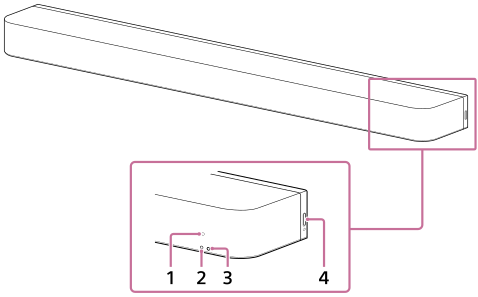
-
Remote control sensor
Point the supplied remote control at the remote control sensor of the bar speaker to operate the speaker system.
-
Sub status indicator (white)
Indicates the speaker system status by lighting or flashing in white.
-
Main status indicator (colored)
Indicates the speaker system status by lighting or flashing in 5 colors (white/light blue/blue/green/red).
-
 (Power)
Turns on the speaker system. If you press this button when the speaker system is turned on, the speaker system is set to standby mode.
Press and hold this button for more than 10 seconds to reset the speaker system.
Rear
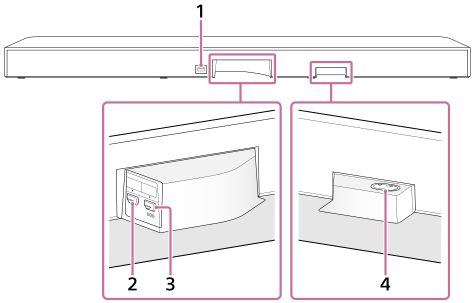
-
FOR SERVICE port
-
HDMI IN jack
-
HDMI OUT (TV (eARC/ARC)) jack
This is an HDMI jack dedicated for connection to a TV.
Use an HDMI cable to connect a TV that has an HDMI input jack. The speaker system is compatible with eARC and ARC. ARC is a feature that sends TV sound from the HDMI jack on the TV to an AV device such as the speaker system via an HDMI cable. eARC is an advanced version of ARC that enables transmission of object-based audio and multi-channel LPCM content that cannot be transmitted with ARC.
-
AC inlet
Hint
- There are three tactile dots that are about 1 mm (1/16 in) in size under the HDMI OUT (TV (eARC/ARC)) jack. Use them as a guide during connection.