


Using with an Optional Subwoofer and Rear Speakers
Installing
This section describes an example of installation using a combination of an optional subwoofer and rear speakers that are compatible with the speaker system.
Example of installing the speaker system in combination with a subwoofer and rear speakers
- The sound output from the subwoofer is omni-directional, so the subwoofer can be positioned as desired.
- Rear speakers should be placed in the rear as a pair, facing the viewing position (sound listening position). It is recommended that the height of the rear speakers be placed in line with the height of the ear.
For details, refer to the operating instructions/Help Guide of the optional subwoofer and rear speakers.
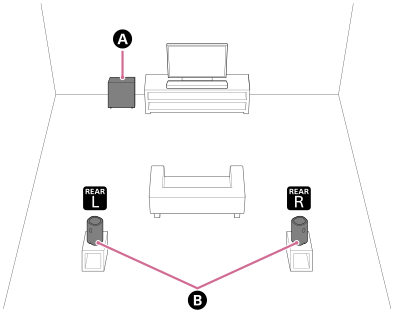
 Subwoofer (not supplied)
 Rear speakers (not supplied)
Example of installing the speaker system in combination with two subwoofers (dual subwoofer connection)
Two subwoofers can be connected to the speaker system to enjoy more powerful bass sound.
- The sound output from the subwoofer is omni-directional, so the subwoofer can be positioned as desired.
- Depending on the placement and room conditions when two subwoofers are installed, less bass sound may be heard. In that case, select the optimal phase setting (*) on the app.
*Displayed by tapping [Settings] - [Sound Settings] - [Subwoofer phase setting] on the remote control screen on the app.
Note
- This speaker system supports the connection of two subwoofers. The subwoofers to be connected must meet the following conditions.
- Have the same model name.
- Support the connection of two subwoofers.
- Check the product specifications on Sony’s product information website to confirm if the subwoofers support the connection of two subwoofers.
- The subwoofer may not connect to the speaker system until the software of the speaker system or subwoofer is updated.
-
Example of two subwoofers installed next to each other
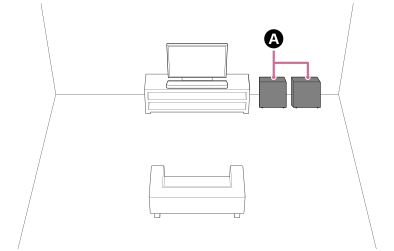 Subwoofers (not supplied)
-
Example of two subwoofers installed far apart
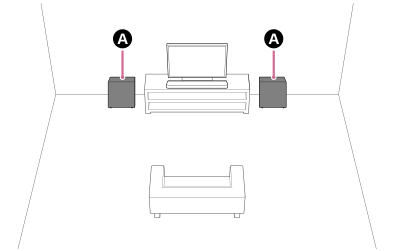 Subwoofers (not supplied)
Setting up
If you have not yet started setting up the speaker system
Use the app to start the setup for the speaker system and optional speakers. During the setup process, the app will guide you to connect optional speakers.
If you have already completed the setup of the speaker system
Set up the optional speakers on the remote control screen on the app.
Check [Settings] - [Wireless Speaker Settings] - [Wireless Speaker Connection] on the remote control screen on the app.
Note
- No audio will be output unless the setup of the optional speakers is completed on the app.
- A software update may be required when using the speaker system with the optional speakers. Perform the software update while the speaker system and the optional speakers are connected to a power source.
If changing the installation method or position of the speaker system or optional speakers
Perform [Sound Field Optimization](*) on the app.
*Displayed by tapping [Settings] - [Sound Settings] - [Sound Field Optimization] on the remote control screen on the app.