


Part names
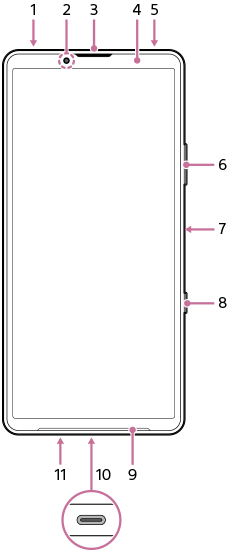
- 3.5 mm audio jack
- Front camera
- Ear speaker/Second loudspeaker
- Proximity sensor/Light sensor
- Second microphone
- Volume button/Zoom button (up/down)
- Power button/Fingerprint sensor
- Shutter button
Hint
-
You can assign a different action to the shutter button when not using the Camera app. To turn the setting on or off, find and tap as follows, and then tap the switch for the desired setting.
-
Taking a screenshot by pressing the shutter button
[Settings] > [System] > [Gestures] > [Shutter button] > [Take a screenshot]
-
Launching the Camera app by long-pressing the shutter button
[Settings] > [System] > [Gestures] > [Shutter button] > [Launch Camera app]
-
-
- Main loudspeaker
- USB Type-C® port
You can also access the internet via a LAN cable by using a commercially available USB-LAN adapter.
Note
- Some USB-LAN adapters may not work properly.
- Main microphone
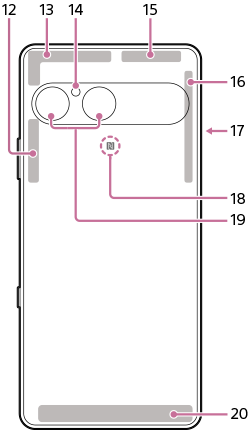
- 5G/4G/Wi-Fi®/Bluetooth antenna
- 5G/4G antenna
- Light/Flash
- 5G/4G/Wi-Fi/Bluetooth/GPS antenna
- 5G/4G antenna
- SIM card/microSD card tray
- NFC detection area
- Main camera
- 5G/4G antenna
TP1002272109