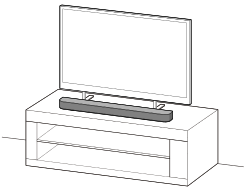
Installing the Speaker System on a TV Stand and Shelves
-
Connect the bar speaker cable attached to the rear of the bar speaker to the FRONT SPEAKER jack on the rear of the subwoofer.
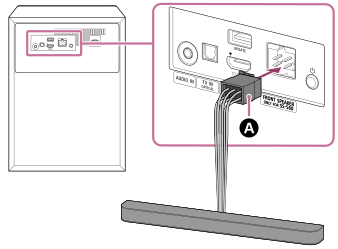
 Bar speaker cable
-
Install the bar speaker on a TV stand and shelves.
Install the bar speaker in an open space in front of the TV so that the top of the bar speaker does not overlap the TV and does not hide the TV screen or the remote control sensor on the TV.
If the bar speaker cannot be placed properly due to interference with the legs of the TV, see “How to deal with the case where the bar speaker cannot be placed properly due to interference of the TV legs.”
Example of installation with a TV with two TV legs on either side:
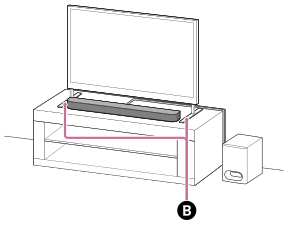
 Two TV legs on either side
Example of installation with a TV with wide TV leg in the center:
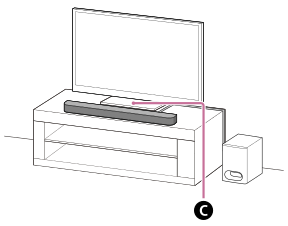
 Wide TV leg in the center
-
Install the subwoofer.
The subwoofer is omni-directional, so the subwoofer can be positioned as desired.
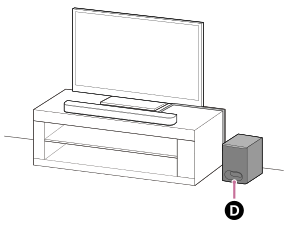
 Subwoofer
-
Connect the rear speaker cables attached to the rear of the rear speakers to the REAR SPEAKERS jack on the rear of the wireless amplifier.
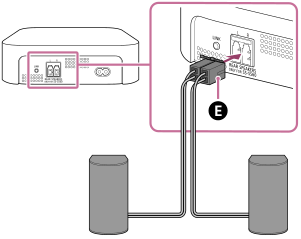
 Rear speaker cables
-
Install the wireless amplifier and rear speakers behind the viewing position.
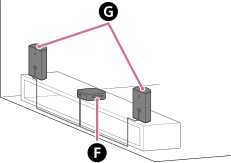
 Wireless amplifier
 Rear speaker
-
Perform [Speaker positioning and volume level settings](*) on the app in the following cases.
- When changing the position and installation method of the bar speaker, rear speakers, and subwoofer
- When changing the viewing environment, such as changing the layout of furniture
- When changing the position of daily viewing
*Displayed by tapping [Settings] - [Sound Settings] - [Speaker positioning and volume level settings] on the remote control screen on the app.
Note
- Do not place metal objects near the subwoofer and wireless amplifier. Wireless functions may become unstable.
- There are ventilation holes at the rear of the subwoofer. Place the subwoofer away from a TV stand or a wall at a distance of 5 cm (2 in) or more.
- Do not install the subwoofer lying on its side.
How to deal with the case where the bar speaker cannot be placed properly due to interference of the TV legs
By attaching the supplied foot to the bar speaker, the bar speaker can be raised above the installation surface, thus avoiding interference with the TV legs.
Attaching of the foot does not improve sound quality.
If the TV leg size corresponds to the following, the speaker system can be installed by attaching the foot.
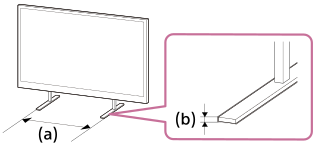
(a) Spacing between TV legs: 750 mm (29 5/8 in) or less
(b) TV leg height: 8.5 mm (11/32 in) or less
-
Prepare what are needed.
-
Foot (2) (supplied)

-
Screw (2) (supplied)

- Phillips screwdriver (not supplied)
-
Foot (2) (supplied)
-
Attach the foot to the bar speaker.
Install the foot according to the following procedure.
- Place the bar speaker with the bottom of the bar speaker facing up.
- Position the foot by fitting the projecting part on the inside of the foot into the hole for the foot projecting part next to the screw hole on the bar speaker.
- Secure the foot with the screw.
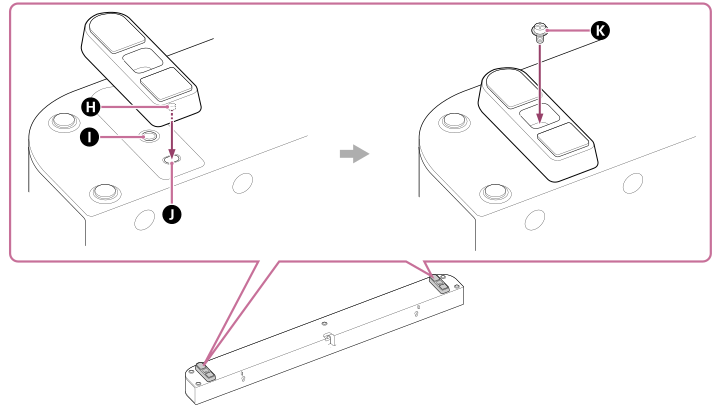
 Projecting part
 Screw hole
 Hole for the foot projecting part
 Screw (supplied)
Hint
- When attaching/detaching the foot, lay out a soft cloth or a similar material to prevent damage to the bar speaker.
- When detaching the foot, after removing the screws, grip the foot and pull while twisting to make it easier to detach.
-
Install the bar speaker.
Be careful not to cover the remote control sensor on the TV with the bar speaker.
After installation, check that the TV can be turned on/off with the TV remote control.