


Listening to the Device Connected with an Analog Audio Cable
The speaker system can be used to play the sound of an audio device that is connected to the AUDIO IN jack on the subwoofer.
-
Connect an audio device to the AUDIO IN jack.
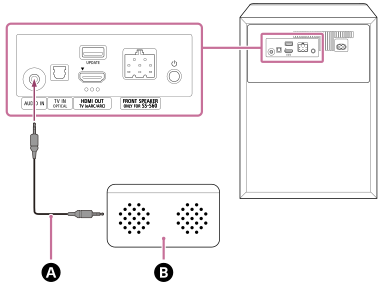
 Analog audio cable (not supplied)
 Audio device
-
Tap the playback information/input switching area on the upper part of the remote control screen on the app to switch the input to [AUDIO IN].
-
Start playback on the audio device.
-
Adjust the volume.
To operate using the supplied remote control
- Press INPUT (Input) to light the main status indicator on the subwoofer in green.
- Start playback on the audio device.
- Adjust the volume.
Note
- When the [AUDIO IN] input is selected, playback is performed in [Multi Stereo]* regardless of the item selected in the [Sound Field Setting].
* Outputs from all speakers without adding surround effects.
TP1001687530