


BRAVIA Theatre Sub 9
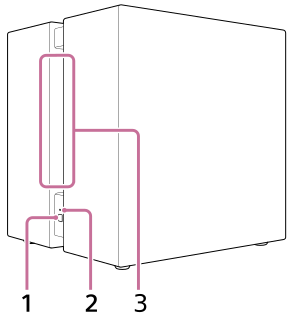
Left side, front
-
LINK (It is on the lower part of the left side.)
- Press: Press to connect the subwoofer. Follow the connection procedure to operate.
- Press and hold for 2 seconds until the notification sound plays: Turns off the subwoofer.
- Press and hold for 10 seconds until the second notification sound plays: Resets the subwoofer.
-
Power indicator (It is on the lower part of the left side.)
Indicates the subwoofer status by lighting or flashing in 3 colors (white/blue/red).
-
Opening
Sound is output from this opening that runs from the left side to the right side of the subwoofer.
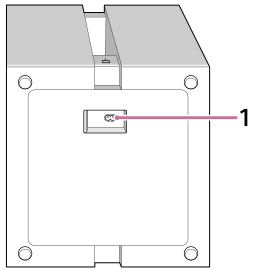
Bottom
-
AC inlet
Note
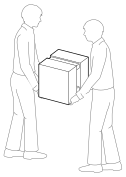
- When carrying the subwoofer, have 2 people hold the bottom.
Hint
- The AC inlet is on the bottom of the subwoofer. When connecting the AC power cord (mains lead), there is no problem laying the subwoofer down. Handle the subwoofer carefully when laying it down.
- Route the AC power cord (mains lead) connected to the subwoofer in the direction you want.
TP1002102712