


Supplied Remote Control
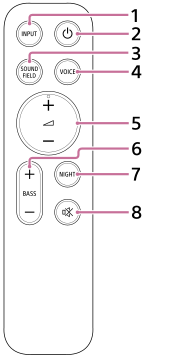
-
INPUT (Input)
Switches to the next input.
The input source switches as follows.
TV
 BLUETOOTH
USB(*)
TV ・・・
BLUETOOTH
USB(*)
TV ・・・* Displayed when [Using a USB drive to play music] (**) is on in models with the
 (USB) port.
**Displayed when you tap [Settings] - [System Settings] - [Using a USB drive to play music] on the remote control screen on the app.
-
 (Power)
Switches between power on and standby on the speaker system.
-
SOUND FIELD (Sound field)
Turns on/off the surround sound effect on the speaker system.
-
VOICE (Voice mode)
Turns on/off the voice mode on the speaker system.
When a Sony TV compatible with the linkage function of the speaker system is connected, the voice zoom is turned on/off instead of the voice mode by selecting TV input on the speaker system.
-
 (Volume) + (plus)(***)/– (minus)
Used to adjust the volume of the speaker system.
***
(Volume) + (plus) has a tactile dot. Use it as a guide during operation. -
BASS (Bass level) + (plus)/– (minus)
Adjusts the bass volume.
-
NIGHT (Night mode)
Turns on/off the night mode on the speaker system.
-
 (Muting)
Temporarily turns off the sound on the speaker system.
About the replacement of batteries for the supplied remote control
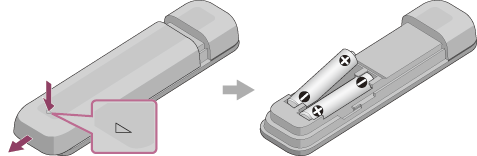
If the speaker system does not respond when operating with the supplied remote control, replace the two batteries with new batteries.
Use R03 or LR03 (size AAA) batteries for replacement.
To remove the battery cover, slide it off while pressing the triangular mark on the back of the remote control.
If the remote control does not work properly
- Point the remote control at the remote control sensor on the bar speaker.
- Remove any obstructions between the remote control and the bar speaker.
- Check that the + (positive) and - (negative) of the battery are in the correct orientation.
- Replace both batteries in the remote control with new ones if they are older batteries.
- Check that the correct button on the remote control is being pressed.