


Installing the Bar speaker and Subwoofer
Place the bar speaker on a shelf, such as a TV stand, or mount it on a wall, depending on the location of the TV.
Example of installing the bar speaker on a TV stand and shelves:
Install the bar speaker in an empty space in front of the TV.
Be careful not to cover the TV screen or remote control sensor on the TV with the bar speaker.
The sound output from the subwoofer is omni-directional, so the subwoofer can be positioned as desired.
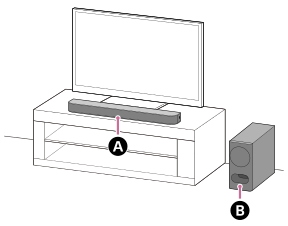
 Bar speaker
 Subwoofer
Perform [Speaker positioning and volume level settings](*) on the app in the following cases.
- Changing the position and installation method of the bar speaker and subwoofer
- When changing the position of daily viewing
- When changing the viewing environment, such as changing the layout of furniture
*Displayed by tapping [Settings] - [Sound Settings] - [Speaker positioning and volume level settings] on the remote control screen on the app.
Example of mounting the bar speaker on a wall:
Mount the bar speaker under the TV mounted on a wall.
For details, see “Mounting the Bar Speaker on a Wall.”
The sound output from the subwoofer is omni-directional, so the subwoofer can be positioned as desired.
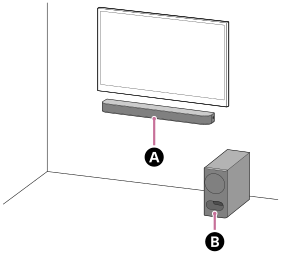
Bar speaker
Subwoofer
Note
- Do not place metal objects near the bar speaker. Wireless functions may become unstable.
- There are ventilation holes at the rear of the bar speaker. Place the bar speaker away from the TV or wall at a distance of 10 mm (25/64 in) or more.
- Place the subwoofer away from a TV stand or a wall at a distance of 5 cm (2 in) or more.
- Do not install the subwoofer lying on its side.