


Updating the Software
When new software is available, a notification will appear on the remote control screen on the app. Update software by following the screen on the app.
Note
- Before starting updating, check the following.
- The subwoofer is turned on and connected to the bar speaker.
- The BLUETOOTH function is turned on.
-
Access the support page by following the screen on the app and save the software update file to a USB memory.
-
Connect the USB memory prepared in step 1 to the UPDATE/
 (USB) port(*) on the rear of the bar speaker.
 * The port varies depending on the country/region of purchase.
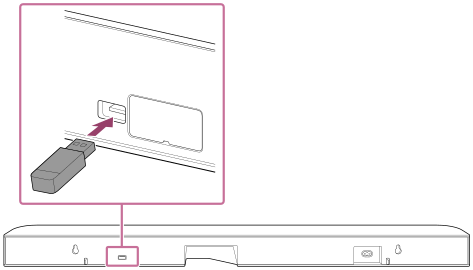
Software updates will begin automatically.
During the update, the main status indicator on the bar speaker and the power indicator on the subwoofer flash slowly, alternating between white and blue.
When the update is complete, the main status indicator on the bar speaker will flash in white every 2 seconds.
-
Remove the USB memory.
-
Disconnect the AC power cord (mains lead) from the wall outlet (main) to turn off, and then wait several minutes before reconnecting it.
Hint
- When software updates are available, we will also notify you on our support page. For the support page, see “Customer Support Website.”
TP1002102552