


Turning on or off the BLUETOOTH function
You can connect to the speaker from a paired BLUETOOTH device when the speaker’s BLUETOOTH function is set to on.
At the time of purchase, these settings are set to on.
- Touch and hold – (volume) and
 (BLUETOOTH) on the speaker for about 5 seconds.
The
(BLUETOOTH) indicator on the speaker turns off and the BLUETOOTH function is set to off.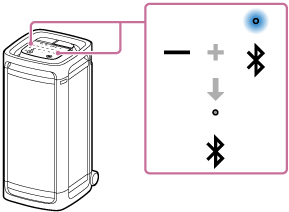
When you touch and hold – (volume) and
(BLUETOOTH) on the speaker simultaneously for about 5 seconds once again, the (BLUETOOTH) indicator on the speaker turns on and the BLUETOOTH function is set to on.
Hint
-
With the device previously connected via a BLUETOOTH connection, the speaker is reconnected when its BLUETOOTH function turns on as long as the BLUETOOTH function of the device remains active.
Note
-
You cannot perform the following operations when the BLUETOOTH function is set to off:
-
Pair and/or connect with BLUETOOTH device.
-
Use the “Sony | Sound Connect” app.
-