


Parts and controls
-
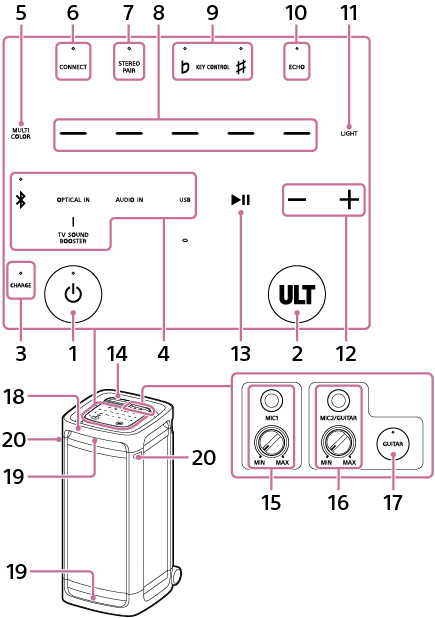
 (power) button with indicator
 -
ULT button
-
CHARGE indicator
-
Direct function keys
-
 (BLUETOOTH) with indicator
 -
OPTICAL IN
-
TV SOUND BOOSTER
-
AUDIO IN
-
USB
-
-
MULTI COLOR
-
CONNECT with indicator
-
STEREO PAIR with indicator
-
Lighting color selectors (red/yellow/green/blue/purple)
-
KEY CONTROL
 (flat) with indicator/
 (sharp) with indicator
 -
ECHO with indicator
-
LIGHT
-
–/+ (volume)
-
 (play)*
-
Cap
-
MIC1 jack (Φ 6.3 mm)
MIC level (MIN/MAX) knob
-
MIC2/GUITAR jack (Φ 6.3 mm)
MIC and GUITAR level (MIN/MAX) knob
-
GUITAR button with indicator
-
Handle
-
Lights
-
Mic holders
-
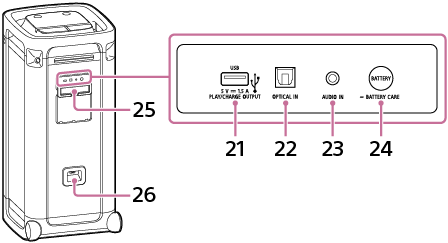
PLAY/CHARGE OUTPUT (DC power output only) port (USB)
-
OPTICAL IN (optical digital audio input) connector
-
AUDIO IN jack (Φ 3.5 mm)
-
BATTERY button/
 BATTERY CARE button
 -
Cap
-
AC input jack
* Touching and holding(play) on the speaker for about 5 seconds makes the speaker play the music track stored for demonstration purposes. To disable this feature, tap(play) on the speaker once again.
Note
-
The port, connector, and jacks on the speaker are not designed for water resistant. Do not use the speaker in places where the speaker is likely to have water splashed on it. When you are finished with using the speaker, be sure to securely close the caps.