


Charging a USB device such as a smartphone or iPhone
You can charge a USB device, such as a smartphone or iPhone, by connecting it to the speaker via USB. Even if the speaker is not connected to an AC outlet, its built-in battery can supply power to a USB device.
- Connect a USB device, such as a smartphone or an iPhone, to the PLAY/CHARGE OUTPUT port (USB) on the speaker with a USB cable (commercially available).
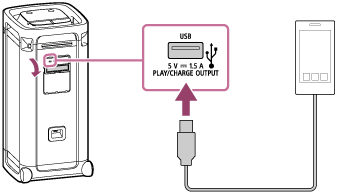
- Turn on the speaker.
You hear the notification sound from the speaker, the
 (power) indicator on the speaker lights up in white, and the speaker starts supplying power to the connected USB device for battery charging.
Note
-
While the speaker is supplying power to the other device, the Automatic Power Off function is turned off.
-
Turning off the speaker stops power supply to the connected USB device.
-
When the voice guidance says “Low Battery” and the CHARGE indicator starts flashing slowly, the built-in battery is running low and needs to be charged. While in this state, the speaker is not capable of supplying power to other devices and may automatically turn off.
-
Do not charge the speaker's built-in battery in places where the speaker is likely to have water splashed on it. The supplied AC power cord (mains lead) as well as the jacks and port (USB, AUDIO IN, OPTICAL IN, MIC, GUITAR) behind the cap are not designed for water resistant.
-
After you disconnect the USB cable from the speaker, be sure to close the cap securely. The cap plays a very important role in maintenance of the water resistant performance.