


将PC设定为DLNA服务器和控制器(Windows 10)
Windows 10支持DLNA1.5。Windows 10 PC可用作DLNA服务器和控制器。
通过从Windows 10 PC操作,进行以下设定后,您可以使用扬声器欣赏家用网络上DLNA服务器(包括Windows 10 PC)中存储的音乐。
如果将“Sony | Music Center”下载到智能手机、iPhone等并操作Windows 10 PC,请执行“ 通过网络聆听PC上的音乐(“Windows Media Player”和“Sony | Music Center”配合操作)”。
- 在画面左下方的Start菜单中选择[
 Settings]。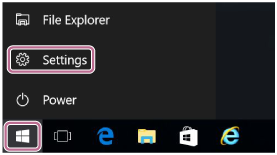
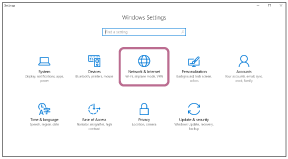
- 选择[Network & Internet]。
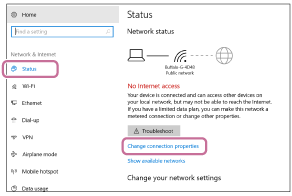
- 选择[Status] – [Change connection properties]。
-
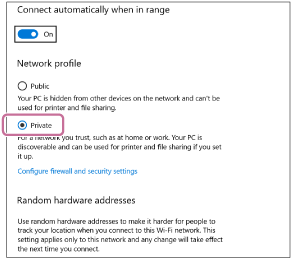
选择[Private]。
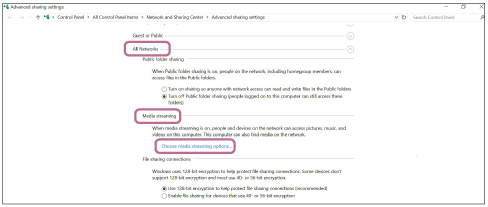
- 从[All Networks]的[Media streaming]中选择[Choose media streaming options...]。
- 选择[Allow All]。
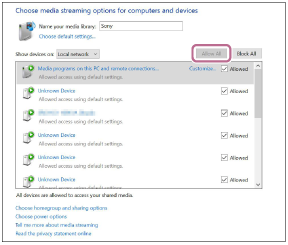
出现[Allow All Media Devices]画面。
- 选择[Allow all computers and media devices]。如果允许([allow])本地网络中的所有设备访问网络,请选择[OK]并关闭画面。
