


Location and function of parts
Left unit
The noise canceling/Ambient Sound Mode button, the power button, and the headphone cable input jack are located on the left unit.
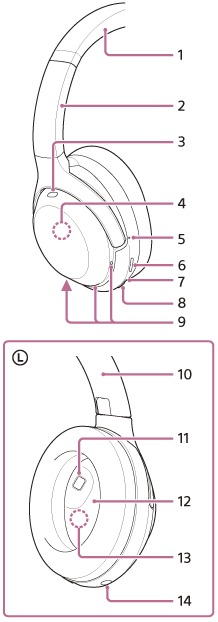
-
Headband
-
Headband slider
Slide to adjust the length of the headband.
-
Noise canceling function microphone (external)
Picks up the sound of the noise when the noise canceling function is in use.
-
Built-in antenna
A BLUETOOTH antenna is built into the headset.
-
Tactile dot
-
Noise canceling/Ambient Sound Mode button
NC/AMB: Noise canceling/Ambient Sound Mode mark
-
Indicator (red/blue)
Lights up in red or blue to indicate the power or communication status of the headset.
-
Power/BLUETOOTH button
 : Power mark
 : BLUETOOTH mark
 -
Voice pickup microphones
Pick up the sound of your voice when talking on the phone or using the Speak-to-Chat mode.
-
Serial number
It is located on the inside of the headband slider.
-
Proximity sensor
Detects whether the headset is worn on the ears.
-
L (left) mark
-
Noise canceling function microphone (internal)
Picks up the sound of the noise when the noise canceling function is in use.
-
Headphone cable input jack
Connects a music player or other device with the supplied headphone cable. Make sure that you insert the cable until it clicks. If the plug is not connected correctly, you may not hear the sound properly.
Right unit
The USB Type-C port is located on the right unit. The touch sensor control panel is located on the flat surface of the exterior of the right unit.
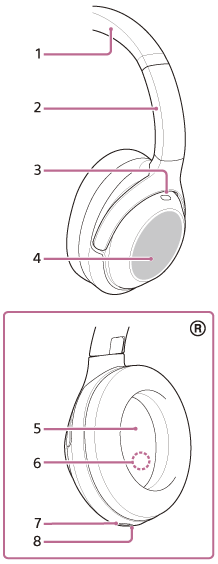
-
Headband
-
Headband slider
Slide to adjust the length of the headband.
-
Noise canceling function microphone (external)
Picks up the sound of the noise when the noise canceling function is in use.
-
Touch sensor control panel
It is located on the flat surface on the exterior of the right unit.
You can use the touch sensor control panel to perform operations such as music playback remote control of the BLUETOOTH device.
-
R (right) mark
-
Noise canceling function microphone (internal)
Picks up the sound of the noise when the noise canceling function is in use.
-
USB Type-C port
Connects the headset to an AC outlet with a USB AC adaptor or to a computer with a USB Type-C cable to charge the headset.
-
Charging indicator (red)
Lights up in red while charging.