


Speaking with someone while wearing the headset (Speak-to-Chat)
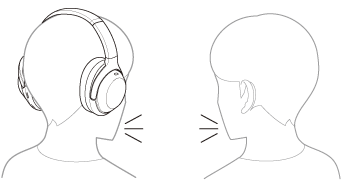
Speak-to-Chat is a feature that makes it easier to hear the voice of your conversation partner while wearing the headset. Set up with the “Sound Connect” app.
While the Speak-to-Chat mode is activated, the headset pauses the music being played and captures the voice of the person you are conversing with to make it easier to hear.
When the headset does not detect the wearer’s voice for a certain period of time, the Speak-to-Chat mode ends automatically.
To end the mode sooner, operate the buttons or the touch sensor control panel of the headset.
To enable Speak-to-Chat
To activate the Speak-to-Chat mode, Speak-to-Chat must be enabled in advance.
In the factory settings, Speak-to-Chat is disabled. To enable, change the setting with the “Sound Connect” app.
To disable Speak-to-Chat
To disable, change the setting with the “Sound Connect” app.
Hint
- You can also use the “Sound Connect” app to switch between enabled/disabled, change the sensitivity of the automatic audio detection, and change the time until the Speak-to-Chat mode ends. In the factory settings, the time until the mode ends is set to about 15 seconds.
Note
- The Speak-to-Chat mode activates when it detects the speech of the person wearing the headset. In rare cases, the mode may activate unintentionally in response to vibrations caused by actions such as brushing your teeth, coughing, or humming, or by devices such as electric toothbrushes, massagers, or shavers. If the Speak-to-Chat mode starts frequently, set the Speak-to-Chat mode to “L Sensitivity”.
- The Speak-to-Chat mode may not start if the speech of the person wearing the headset is not detected due to ambient noise. In this case, try speaking longer or louder. However, in places with extremely loud noise, such as on an airplane, the Speak-to-Chat mode may not start even if you speak longer or louder.