


Wearing the headset
-
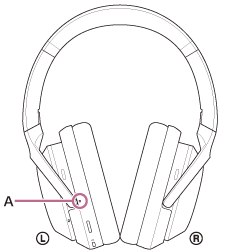
Check the left and right units of the headset.
There is a tactile dot (A) on the left unit.
-
Extend the headband slider.
Extend the headband slider to its full length before putting on the headset.

-
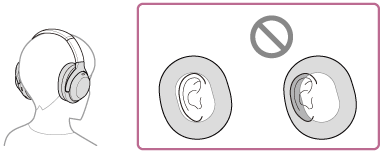
Put on the headset.
Put on the headset with the earpads fitting snugly over your ears.
-
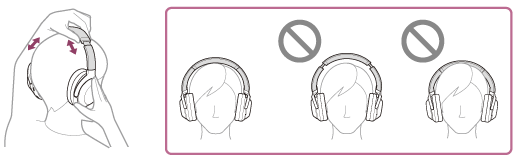
Adjust the length of the headband slider.
Adjust the headband slider to a length where the headband touches the top of your head.
-
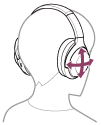
Adjust the orientation of the units.
Adjust the orientation of the left and right units so that the earpads fit snugly all around your ears.
If you put on the headset without adjusting the headband slider, the headset may not be positioned properly on your head, resulting in discomfort or a weak noise canceling effect.
The wearing detection function of the headset may also not work properly and cause music playback to stop automatically or activate the automatic power off function (the battery saving function) to automatically turn off the headset.If you feel that the headband does not fit and easily displaces after adjusting the headband slider, adjust the headband slider to a shorter length. This may improve the situation.
When attaching and removing the headset
In the factory settings, the built-in proximity sensor in the left unit detects when the headset is worn on or removed from your ears. When it is detected, the headset automatically controls the touch sensor control panel’s action, powering off the headset, pausing music playback, and other functions.
When the headset is worn
- You can use the touch sensor control panel of the headset to play music, make and receive calls, and other actions.
When the headset is removed
- When you listen to music while wearing the headset on your ears, the headset will pause music playback automatically if the headset is removed. When the headset is worn again, the headset resumes music playback.
- In order to save the battery, the headset will automatically turn off after 15 minutes of not being worn.
- When the headset is removed, music playback, making and receiving calls, and other actions cannot be performed even if you tap the touch sensor control panel. This is to prevent the headset from reacting incorrectly.
The noise canceling function cannot be used even if you press the noise canceling/Ambient Sound Mode button. - When you are talking on the headset while wearing the headset on your ears, the call is automatically switched to the smartphone if the headset is removed. When you put the headset on your ears again, the call is switched to the headset.
Hint
- By using the “Sound Connect” app, you can change the settings of the wearing detection automatic music playback pause and resume function and the wearing detection automatic power off function (the battery saving function).
Note
- In the following cases, wearing detection may react incorrectly. When you are not using the headset, turn off the headset.
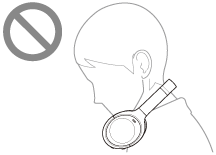
- With the headset around your neck, your chin goes into the housing.
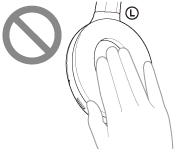
- Your hand is placed inside the earpad of the left unit.
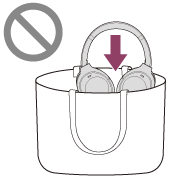
- The headset is inside a container such as a bag.
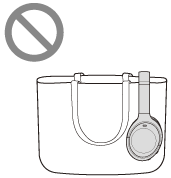
- The headset is hanging on the edge of something such as a bag.
- The headset is on a surface such as a desk.
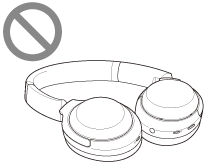
- With the headset around your neck, your chin goes into the housing.
-
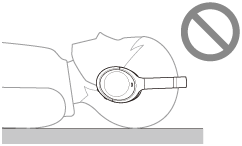
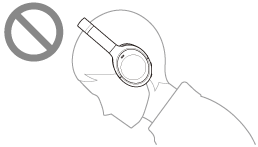
When you wear the headset with your face up or down as shown below, or when you wear the headset upside down, wearing detection may not work properly, and you may not be able to operate the touch sensor control panel or the noise canceling/Ambient Sound Mode button. Wear the headset correctly while facing forward, or press the power button briefly.
- Wearing the headset while lying down or with your face up
- Wearing the headset with your face down
- Wearing the headset while lying down or with your face up
- When you wear the headset over a cap, cloth, a scarf, or hair, wearing detection may not work properly, and you may not be able to operate the touch sensor control panel. Wear the headset so that your ears are inside the earpads.
- When the supplied headphone cable is connected to the headset, wearing detection does not work.
- The wearing detection automatic music playback pause and resume function is only available when connected via BLUETOOTH connection.
- The connected device or playback application you are using may not support the wearing detection automatic music playback pause and resume function.
- When attaching and removing the headset, the call is switched only when the wearing detection automatic power off function is enabled.
-
If the proximity sensor part inside the left unit housing gets fogged up or there are water droplets on it due to condensation or humidity from sweat, etc., wearing detection may not work properly. When the sensor part is fogged up or there are water droplets on it, leave the proximity sensor part facing up until the moisture disappears.
A: Proximity sensor part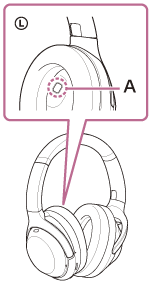
- External force beyond the range of normal use, such as turning the unit's rotary axis or other moving parts to the opposite side of the normal direction or dropping the headset, may cause damage. The warranty does not cover malfunctions caused by damage due to improper handling.