


Listening to music of a portable audio device, etc. through a wired connection
You can listen to music from a portable audio device or similar device through the speaker by connecting the device with a commercially available audio cable.
Note
- Before establishing a connection between the speaker and a portable audio device, turn down the volume of the speaker and the device to avoid any sudden loud sound output from the speaker.
- Connect a device to the AUDIO IN jack on the speaker with a commercially available audio cable.
For connection, use an audio cable with a stereo mini plug (no resistance)* at both ends.
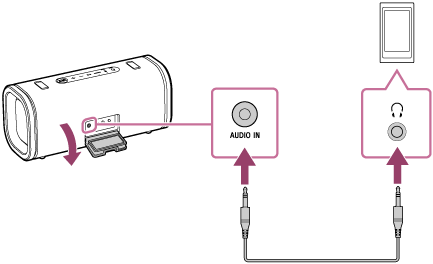
* If you use an audio cable (with stereo mini plugs) with significant resistance, the volume may be lower. Therefore, make sure you use a cable (with stereo mini plugs) without resistance.
- Turn on the speaker.
You hear the notification sound from the speaker, and the
 (power) indicator on the speaker lights up in white.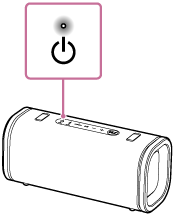
- Turn on and start playback on the connected device.
- Adjust the volume to a moderate level on the connected device.
If the volume is adjusted by operations on the connected portable audio device, the
(power) indicator on the speaker will not flash. - Press the –/+ (volume) buttons on the speaker to adjust the volume.
When you press the –/+ (volume) buttons to adjust the volume, the
(power) indicator on the speaker flashes once or 3 times.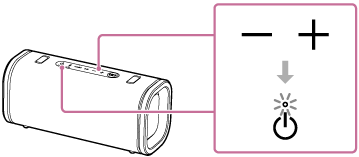
Hint
-
When you cannot hear the sound, raise the volume on the connected device.
-
By using the “Sony | Sound Connect” app, you can play music from a device connected via a BLUETOOTH connection through the speaker, even while another device is connected to the AUDIO IN jack.
Note
-
While an audio cable is plugged to the AUDIO IN jack, priority is given to the audio output through the AUDIO IN jack and audio output from the BLUETOOTH device is disabled. Depending on the state of the BLUETOOTH connection, the
 (BLUETOOTH) indicator lights or flashes in blue. This, however, does not indicate a malfunction.
 -
When connecting a portable audio device to the AUDIO IN jack and playing music, you cannot use the buttons on the speaker to perform operations such as pause, skip to the beginning of the next track, and skip to the beginning of the current track.
-
Do not use the AUDIO IN jack in places where the speaker is likely to have water splashed on it. The supplied accessories and the connectors of this speaker (USB, AUDIO IN) are neither waterproof nor dustproof.
-
Be sure to close the cap completely after disconnecting the audio cable from the speaker.
The cap plays a very important role in maintenance of the waterproof and dustproof performance.