


Notes on charging
Life span of the built-in lithium ion battery
-
Even if you do not intend to use the speaker for a long time, charge the built-in battery sufficiently once every 6 months to maintain its performance.
-
If the speaker is not used for a long time, it may take longer to charge the built-in battery.
-
The rechargeable built-in battery has a life span. As time passes and the number of times that the built-in battery is used increases, the capacity of the rechargeable built-in battery slowly decreases. When the amount of time that the built-in battery can be used seems significantly shorter, despite having been fully charged, contact Sony support contact or your nearest Sony dealer.
-
When the amount of time that the built-in battery can be used seems significantly shorter, it could mean that the rechargeable built-in battery has expired.
-
The life span of the rechargeable built-in battery differs depending on the usage, environment, and storage method.
Caution
When the speaker detects an abnormality in the interior temperature or in the built-in rechargeable battery, the  (power) indicator (orange) on the speaker starts double flashing.
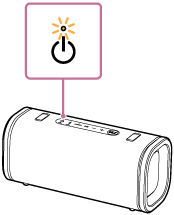
If an abnormality is detected, disconnect the USB cable, wait for a while, and then restart the speaker (by pressing and holding the (power) button on the speaker for about 10 seconds). If the problem persists, contact Sony support contact or your nearest Sony dealer.
Note
-
Charging time varies depending on built-in battery usage conditions.
-
Charge the speaker in an ambient temperature between 5 °C and 35 °C (41 °F and 95 °F). Be aware that the room temperature may fall to 5 °C (41 °F) or lower depending on the season, for example, especially in wintertime.
-
The speaker becomes warm during charging. This is not a malfunction.
-
Avoid exposure to rapid temperature change, direct sunlight, mist, sand, dust, or mechanical shock. Also, never leave the speaker in a car parked in the sun.
-
As long as the speaker is connected to an AC outlet by a USB PD compatible AC adaptor, the speaker's built-in battery is capable of charging itself even while the speaker is turned on. However, it may take a long time before charging completes depending on the usage of the speaker. It is recommended that you turn off the speaker before battery charging.
-
In an extremely cold or hot environment, charging stops for safety. If charging takes a long time, it also makes charging of the speaker stop. To resolve these issues, disconnect the USB cable from the speaker and connect it again within a battery charging temperature between 5 °C and 35 °C (41 °F and 95 °F).
-
If the built-in battery is under a high load during charging, charging stops for safety. In such a case, turn down the volume or stop the playback.
-
If you are playing music while the speaker is charging or in a location with high ambient temperatures, the volume may be automatically adjusted for safety reasons.
-
Charging from a USB hub is only guaranteed when you use a self-powered USB hub that carries an authorized logo.