


Enjoying switching the sound effects
You can enjoy switching the sound effects on the speaker.
Enjoying enhanced deep bass sound (ULT button)
You can take either of the following procedures for setup. At the time of purchase, the ULT POWER SOUND setting is turned on.
-
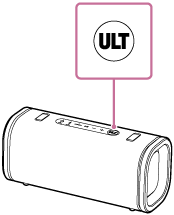
Press the ULT button on the speaker.
Each time you press the ULT button, the setting switches from ULT1, ULT2, and off.
Each time the setting is changed, you hear the notification sound from the speaker, and the ULT button lights up or lights out.

ULT1: Emphasizes deep bass sound.
ULT2: Emphasizes the sense of power.
Off: Turns off the ULT POWER SOUND setting.
-
Use the “Sony | Sound Connect” app.
On the “Sony | Sound Connect” app, tap [Sound Effect], then select one of [Off], [ULT1], or [ULT2].
Hint
-
By using the “Sony | Sound Connect” app, you can turn on or off the notification sound when pressing the ULT button.
Adjusting the equalizer setting to your preference (CUSTOM)
On the “Sony | Sound Connect” app, tap [Sound Effect], then select [CUSTOM].
Tap [CUSTOM EQ], and then adjust the equalizer setting to suit your preference.
Automatically adjusting to the optimal sound according to the environment (Sound Field Optimization)
This proprietary microphone sensing technology detects noises around the speaker while playing music to automatically make adjustments to optimize sound. At the time of purchase, Sound Field Optimization is set to on.
To change the Sound Field Optimization setting
On the “Sony | Sound Connect” app, change the [Sound Field Optimization] setting.
Note
-
In some cases, the surrounding noise may prevent the sound from being optimized.
-
When using the Stereo Pair function or the Party Connect function, the setting for Sound Field Optimization is turned off.
-
When the sound effects, such as the ULT POWER SOUND, are enabled, the STAMINA power option will automatically turn off.