


USB-DAC screen in “Music player”
You can use the player as a USB-DAC device. Use this function to listen to music content on a computer.
To switch to the USB-DAC function
On the library screen in the “Music player”, tap [USB DAC].
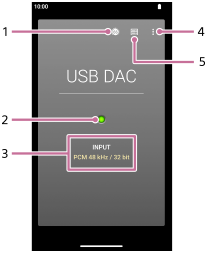
-
Volume dialog button
-
Input signal lamp
The lamp indicates the presence and quality of the input signal.
- Lights up in green: PCM signal
- Lights up in blue: DSD signal
- Off: No signal is detected.
-
Sound quality of the input signal (codec, sampling frequency, quantization bit rate)
-
Options button
-
Library top button
Tap to turn off the USB-DAC function.
To turn off the USB-DAC function
Swipe from the left or right edge towards the center of the screen and then release your finger when an arrow icon appears at the left or right edge of the screen.
Option menu
Tap  (Options) to display the option menu.
- Settings
- Select the item to display the Settings menu for “Music player”.
Hint
- Swipe the USB-DAC screen upwards if you want to adjust the sound.

The contents of the Help Guide may be subject to change without notice due to updates to the product's specifications.