


Using the USB Type-C port cap
Leaving sweat or water droplets on the USB Type-C port may cause the port to corrode and result in a malfunction. Always keep the port cap attached to the USB Type-C port of the player, except when using the USB Type-C cable (for charging, music transfer, etc.).
There is a charge for repairing malfunctions caused by corrosion of the USB Type-C port.
Attach the USB Type-C port cap ( ) to the USB Type-C port (
 ) of the player. The USB Type-C port cap () is pre-inserted into the USB Type-C port ().
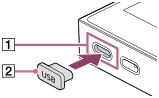
: USB Type-C port
: USB Type-C port cap

The contents of the Help Guide may be subject to change without notice due to updates to the product's specifications.