


Installing on the Floor or Shelf
This section explains examples of installing the rear speaker.
How to install
The following installation diagram is an example.
Example of installation in combination with the sound bar and BRAVIA (TV)
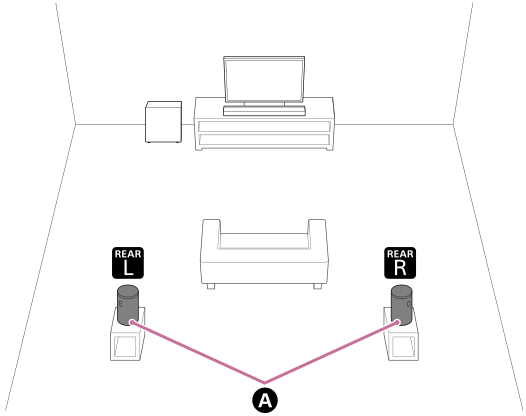
 Rear speakers
Example of installation with the multi-channel AV receiver/multi-channel AV amplifier
This is an installation example for a 5.1 channel speaker system.
When used with a 5.1 channel speaker system, the front and center speakers and subwoofer are required in addition to the rear speaker.
Refer to the Help Guide of the multi-channel AV receiver/multi-channel AV amplifier for information on speaker placement according to speaker system configuration.
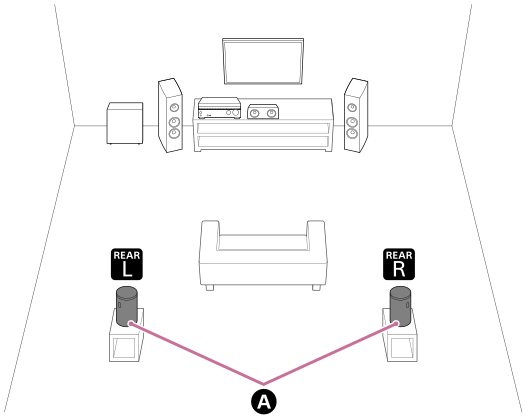
Rear speakers
Installing the rear speaker
Install 2 rear speakers in combination as a pair on compatible models.
- Place the rear speakers backward toward the viewing position.
- It is recommended that the height of the rear speakers be placed in line with the height of the listener's ears.
-
Check the labels on the bottom of the rear speakers to identify the left and right rear speakers.
The left rear speaker is labeled “REAR L” and the right rear speaker is labeled “REAR R.”
In the hollow area on the bottom of the left rear speaker (REAR L), you will find two tactile dots side by side that are about 1 mm (1/16 in) in size. Use them as a guide to distinguish the left rear speaker from the right rear speaker.
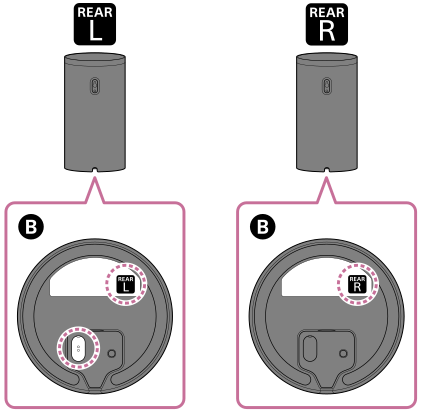
 Bottom of the rear speaker
- Place the left rear speaker in the left rear facing the front and the right rear speaker in the right rear facing the front.
Note
- Sound is also output from the top of the rear speaker. Do not block the top and do not place the rear speaker inside a shelf or just under a ceiling.