


Connecting to an HT-A7000, HT-A5000, or HT-A3000 Sound Bar
HT-A7000, HT-A5000, and HT-A3000 sound bars do not support the “Sony | BRAVIA Connect” app. Display the setting screen of the sound bar on the TV screen to operate the connection procedure.
The sound bar may not connect to the rear speaker until the software of the sound bar is updated.
-
Turn on the sound bar to which the rear speaker is connected as well as the TV, and switch the TV input to the sound bar.
It takes a while for the sound bar to start up. The operation can be performed when [HELLO] or [PLEASE WAIT] disappears from the display panel.
-
Update the software of the sound bar to the latest version.
The procedure for updating the software depends on whether the initial setup of the sound bar has been completed.
Note
- The Help Guide for the sound bar may suggest updating the software with the optional speakers connected to the sound bar, but update the software of the sound bar without connecting the rear speaker.
If the initial setup of the sound bar has already been completed (if you are already using it)
- Press HOME on the remote control supplied with the sound bar and select [Setup] - [Advanced Settings] - [Software Update] - [Network Update] on the home menu displayed on the TV screen.
- Follow the on-screen instructions on the TV screen to update the software.
If the initial setup of the sound bar has not been completed (e.g., immediately after purchasing the sound bar)
- Press HOME on the remote control supplied with the sound bar and follow the on-screen instructions that appear on the TV screen to begin the initial setup.
- Even if the [Checking Wireless Speaker Connection] screen appears, select [Next] without connecting the rear speaker to the sound bar.
- Connect the sound bar to the Internet via the [Easy Network Setup] screen and follow the on-screen instructions to continue the initial setup.
- When the screen confirming the execution of the software update appears, select [Yes] to execute the software update.
- Even if the [Sound Field Optimization] screen appears, proceed without executing it.
- If the [Easy Sound Setup] screen appears, select [Cancel].
- Continue the initial setup until the home menu appears.
Hint
- You can also update the sound bar software to the latest version by downloading the latest software from Sony’s support page to a USB memory.
For details, refer to the Help Guide for the sound bar.
-
Connect the AC power cord (mains lead) to the AC inlet on the rear speaker, then connect to the AC outlet (mains).
Turn on all the speakers to be connected.
For information on installation, see “Related Topic” listed at the bottom of this page.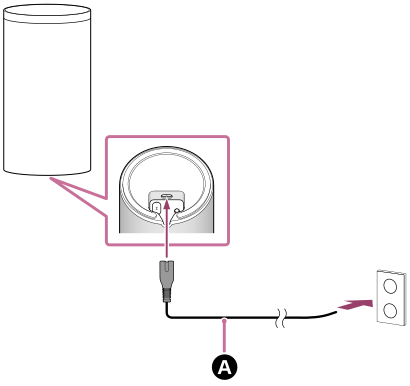
 AC power cord (mains lead) (supplied)
-
Check that the power indicator on the rear speaker lights in white.
When the power indicator lights in white, the connection between the rear speaker and the sound bar is complete.
Note
- The Help Guide for the sound bar may state that the power indicator lights in green, but the power indicator on the rear speaker is white.
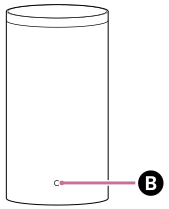
 Power indicator
If the rear speaker does not automatically connect to the sound bar or if you replace another rear speaker that is already connected to the sound bar with this rear speaker
The rear speaker must be connected manually to the sound bar.
For instructions on how to connect manually, refer to “Connecting the Optional Speaker with the Manual Connection” in the Help Guide for the sound bar. You can connect the rear speaker to the sound bar with the same operation.
Note
- If the optional subwoofer has been connected already, it must also be connected manually again.
-
Press HOME on the remote control supplied with the sound bar and perform sound field optimization by selecting [Setup] - [Advanced Settings] - [Speaker Settings] - [Sound Field Optimization] in the home menu.