


Location and function of parts
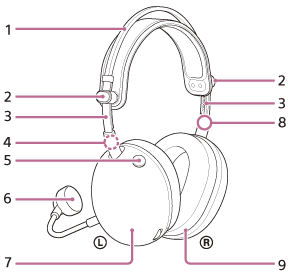
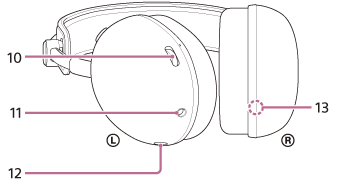
-
Headband
-
Slider knobs (left, right)
Slide to adjust the height of the headband.
-
Headband sliders (left, right)
-
 (left) mark
 -
Microphone on or off button
Switches the microphone on or off.
-
Detachable boom microphone (with windscreen)
Attach to the left unit.
-
Left unit
-
 (right) mark
 -
Right unit
-
Volume dial –/+
Adjust the volume of the headset when connected to a game console. There is a tactile dot on the + side.
-
Headphone cable input jack
Connect a game console using the supplied headphone cable. Make sure the plug is fully inserted. If the plug is not fully inserted, sound may not be heard. Also, the microphone may not be usable.
-
Boom microphone input jack
Connect the supplied boom microphone. Make sure that you insert the cable until it clicks. If the plug is not connected correctly, you cannot use the microphone.
-
Serial number
Located inside the right unit.
To check the serial number
- Make sure the headphone cable is not connected to the headset.
- Remove the earpad from the right unit by pulling it straight off the housing.
The serial number and safety marks are located on the lower center of the right unit.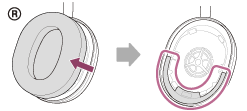
- Attach the removed earpad to the right unit.
Make sure that the direction of the two protrusions on the unit and the holes in the earpad are aligned.
Firmly insert the six tabs into the unit until you hear a click.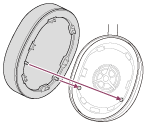
Note
- Do not remove the earpad unless necessary.
- Do not remove earpad in the presence of iron sand or other metal objects. Iron sand or other metal objects may adhere to the magnet inside the headset, causing the headset to malfunction.
- Be sure to attach the earpad in the correct direction. If the earpad is not attached in the correct direction, you may not get the desired acoustic performance.
- Any defects caused by failure to follow the above precautions are not covered by the product warranty.