


System Configuration Examples
This topic shows live streaming system configuration examples using the PWS-110RX1A.
Remarks
- Network services, content, operating system and software of this product may be subject to individual terms and conditions, and may be changed, interrupted, or discontinued at any time.
- When you connect the product to the Internet, connect the unit via a router or connect to a LAN port with a router function. If you connect it without a router function, a security issue may occur.
Note
- Once a security issue occurs, your product may suffer damage caused by malware (malicious software) via the Internet and be exposed to security threats, such as extraction or tampering of content or customer’s information. Not only that, your product may cause damage to the network services without your knowledge.
- Always use this product with the Microsoft Windows Firewall function enabled.
Configuration using a single PWS-110RX1A unit
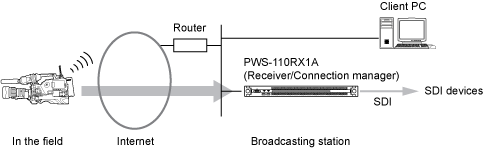
This shows a small-scale system using only one PWS-110RX1A unit. The PWS-110RX1A unit acts as both streaming receiver and connection manager.
Note
- To stream from a camcorder, a camcorder with a CBK-WA100/101 Wireless Adapter attached or a camcorder with network functions is required. For details about supported camcorders, consult your Sony representative.
Configuration using multiple PWS-110RX1A units
Additional PWS-110RX1A units acting as streaming receivers can be used. The following configuration shows an example with one PWS-110RX1A unit acting as both streaming receiver and connection manager, and another unit acting as a streaming receiver.
When using a multiple unit configuration, control the units from a web browser on a client PC, and not the PWS-110RX1A units themselves.

When using XDCAM pocket
You can receive a stream from XDCAM pocket. A separate license is required to use XDCAM pocket.

When transferring files from camcorder to FTP server
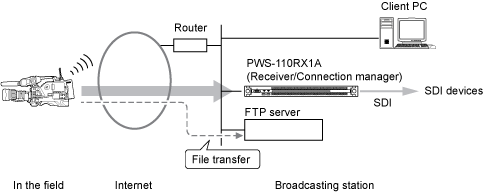
You can transfer video files (clips) stored on an SD card in the camcorder to an FTP server. Configure the FTP server on the same network as the PWS-110RX1A unit, as shown below.
When using an intercom
You can make calls between the broadcast station and units in the field using camcorders with an intercom function.
The audio interface is sold separately. For details about supported devices, refer to the Software Update Guide.
A separate license is required to use an intercom.

Saving video images during streaming to a file
Network storage connected to the same network as a PWS-110RX1A unit can be used to store video images during streaming.
When storing video images during streaming, control the unit from a web browser on a client PC, and not the PWS-110RX1A unit itself.

Point-to-point streaming
You can stream the SDI input of a PWS-110RX1A unit to another PWS-110RX1A unit.

