


Making a call
You can enjoy hands-free calls with a smartphone or mobile phone that supports the BLUETOOTH profile HFP (Hands-free Profile) or HSP (Headset Profile) via a BLUETOOTH connection.
-
If your smartphone or mobile phone supports both HFP and HSP, set it to HFP.
-
Operations may vary depending on the smartphone or mobile phone. Refer to the operating instructions supplied with the smartphone or mobile phone.
- Connect the speaker with a smartphone or mobile phone.
When the BLUETOOTH connection is established, you hear the notification sound from the speaker. Then, the activity of the BLUETOOTH indicator on the speaker changes from flashing to lit.
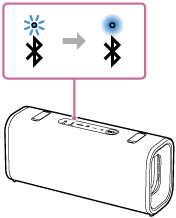
When using the Stereo Pair function
Connect to the speaker whose BLUETOOTH indicator flashes in blue. If you want to control a hands-free call using the speaker, be sure to use the speaker you have connected.
- Operate the smartphone or mobile phone to make a call.
When you make a call, playback pauses and the dial tone is heard via the speaker.
When the receiver takes the call, talk into the microphone on the top surface of the speaker.
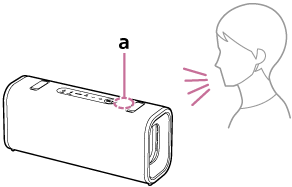
“a” in the illustration indicates the location of the speaker's microphone.
If no dial tone is heard via the speaker
-
The speaker may not be connected with a smartphone or mobile phone with HFP or HSP. Check the connection status on the smartphone or mobile phone.
-
Switch the call device to the speaker by pressing and holding the call button on the speaker for about 2 seconds.
-
- Adjust the volume while the phone is ringing or a phone conversation is in progress.
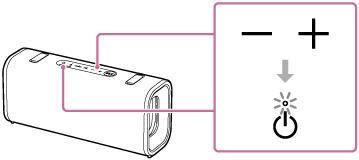
Press the volume buttons on the speaker or operate the smartphone or mobile phone.
The power indicator on the speaker flashes once or 3 times.
- To end a call, press the call button on the speaker.
If you were listening to music before the call, playback will resume when the call ends. If you end a call by operating the smartphone or mobile phone, playback will also resume when the call ends if you were listening to music before the call.
Hint
-
When the receiver is unable to hear or having trouble with hearing your voice, lean closer to the speaker and then talk into its microphone.
-
The volume of music playback and calling is set independently in the speaker.
Note
-
When using the Stereo Pair function or the Party Connect function, the sound of the phone call is output only from the speaker with the blue lit BLUETOOTH indicator.
-
Depending on the smartphone or mobile phone, playback may not pause when making a call.
-
Use a smartphone or mobile phone at least 50 cm (1.6 ft) away from the speaker. Noise may result if the speaker and the smartphone or mobile phone are too close.