


Charging the speaker
The speaker can be operated using the following power supply methods.
-
Power from an AC outlet connected by a commercially available USB AC adaptor along with the supplied USB Type-C cable
-
Power from the rechargeable built-in battery
You can use both USB PD compatible and non-compatible USB AC adaptors.
USB PD: USB Power Delivery
When using the speaker for the first time, be sure to charge the built-in battery for more than 1 hour before turning on the speaker.
With the built-in battery charged in advance, you can use the speaker solely with battery power.
System requirements for charging battery using USB
-
Using a commercially available USB PD compatible AC adaptor capable of delivering DC 5 V / 3.0 A or DC 9 V / 3.0 A. (*1)
-
Using a commercially available USB AC adaptor capable of delivering an output current of 1.5 A or more. (*2)
(*1) We do not guarantee the operations with all the devices compatible with USB PD.
(*2) You can use a USB AC adaptor with an output current of 500 mA or more and less than 1.5 A as well, but the charging time will be several times longer. If you use such a USB AC adaptor, it is recommended that you turn off the speaker before battery charging.
Use of any other USB AC adaptor is not guaranteed for battery charging.
Hint
-
For charging the built-in battery of the speaker, the Battery Care mode option is available in addition to the normal charging method. Battery Care mode limits the maximum charge capacity to approximately 90% and makes the battery life last longer. The playback time available in Battery Care mode is shorter than the time available when the built-in battery is charged by the normal charging method. At the time of purchase, the speaker is not in Battery Care mode.
-
You can enable or disable Battery Care mode using the BATTERY CARE button. The BATTERY CARE button is located behind the cap on the rear side of the speaker.
Press and hold the button for about 2 seconds while the speaker is turned on.
When Battery Care mode is enabled, you will hear the following voice guidance from the speaker.
-
Battery Care mode, ON
When Battery Care mode is disabled, you will hear the following voice guidance from the speaker.
-
Battery Care mode, OFF
-
-
You can enable or disable Battery Care mode with the “Sound Connect” app as well.
- Connect the speaker to an AC outlet to charge it.
Connect one end of the supplied USB Type-C cable to the DC IN/OUT port on the speaker. Connect the other end to a USB AC adaptor. Then, connect the USB AC adaptor to an AC outlet.
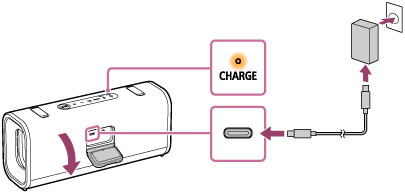
The CHARGE indicator on the speaker lights up in orange while charging is in progress and turns off when charging is complete.
When a commercially available USB PD compatible AC adaptor capable of delivering DC 9 V 3.0 A is connected, charging completes in about 3.5 hours (*).
(*) Time required for the empty battery to be fully charged (100%) while the speaker is powered off.
After you disconnect the USB cable from the speaker, be sure to close the cap securely.
The cap plays a very important role in maintenance of the waterproof and dustproof performance.
Checking the charging completion
When the built-in battery is fully charged and you try to charge it again, the CHARGE indicator on the speaker lights up in orange. Then, it turns off after about 1 minute.
-
When using the Android™ smartphone with Android 8.1 or later installed
When the speaker is connected with the Android smartphone via an HFP (Hands-free Profile) BLUETOOTH connection, tap [Settings] - [Device connection] - [Bluetooth] on the smartphone. The remaining battery power of the speaker is displayed along with the connected BLUETOOTH device name. For details, refer to the operating instructions supplied with the Android smartphone.
Note that the remaining battery power displayed on the smartphone may vary from the actual remaining battery power of the speaker. Consider this information as a reference.
-
When using the iPhone
While the speaker is connected with the iPhone via an HFP (Hands-free Profile) BLUETOOTH connection, the remaining battery power of the speaker is displayed on the widget screen of the iPhone. For details, refer to the operating instructions supplied with the iPhone.
Note that the remaining battery power displayed on the iPhone may vary from the actual remaining battery power of the speaker. Consider this information as a reference.
Checking the remaining level of the rechargeable built-in battery
Press the BATTERY button behind the cap on the rear side of the speaker when the speaker is turned on. The remaining built-in battery power is indicated by the following voice guidance.
81% - 100%: “Battery fully charged”
81% - 90% (Battery Care mode): “Battery Care Mode, Fully Charged, Battery About 90%”
61% - 80%: “Battery about 80%”
41% - 60%: “Battery about 60%”
21% - 40%: “Battery about 40%”
1% - 20%: “Low Battery”
Hint
-
By using the “Sound Connect” app, you can enable or disable the voice guidance.
Battery hours of the built-in rechargeable battery
The following battery hours has been measured under the respective conditions.
-
Approx. 24 hours
-
The Battery Care mode is disabled.
-
A BLUETOOTH connection is established.
-
The volume level is set to 22.
-
The sound mode is set to ULT POWER SOUND.
-
-
Approx. 5 hours
-
The Battery Care mode is disabled.
-
A BLUETOOTH connection is established.
-
The volume level is set to 50 (maximum).
-
The sound mode is set to ULT POWER SOUND.
-
Time required for charging the built-in rechargeable battery
The following charging time has been measured under the respective conditions.
-
Approx. 3.5 hours (*1) (*2)
10 minutes of charging provide approximately 120 minutes of music playback.
-
The Battery Care mode is disabled.
-
The volume level is set to 22.
-
The sound mode is set to ULT POWER SOUND.
-
(*1) Time required for the empty battery to be fully charged (100%) while the speaker is powered off.
(*2) When using a USB PD compatible AC adaptor capable of delivering DC 9 V 3.0 A.
Note
-
The estimated charging time varies depending on the power output capacity of the connected commercially available USB AC adaptor. In addition, it may take longer than the charging time stated above depending on the type and specification of the USB AC adaptor and USB cable. The charging time may vary depending on the ambient temperature or the usage of the speaker as well. You can use both USB PD compatible and non-compatible USB AC adaptors.
The built-in battery hours above is measured using our specified music source.
Actual performance time may vary from the listed time due to the volume, songs played, surrounding temperature, and usage conditions.
When the built-in battery is running low
Depending on the remaining battery power, the voice guidance or the speaker behaves as follows.
-
“Low Battery”
The built-in battery is running low. The CHARGE indicator on the speaker starts flashing slowly. The speaker will automatically turn off after a while. Charge the speaker. The speaker may not be capable of supplying power to other devices.
-
“Battery is empty”
The built-in battery is empty. Even if you try to turn on the speaker, the speaker cannot be turned on. Charge the speaker.
-
The CHARGE indicator on the speaker flashes 3 times in orange when you try to turn on the speaker.
The built-in battery is nearly empty. The speaker cannot be turned on. Charge the speaker.
Hint
-
You can play music while charging the built-in battery using a commercially available USB AC adaptor. However, charging may take a long time depending on the speaker's usage. If charging is your priority, stop playback or turn off the speaker before charging. For charging the built-in battery, you can use both USB PD compatible and non-compatible USB AC adaptors.
-
Enable the STAMINA power option on the “Sound Connect” app to reduce power consumption while using the built-in battery. This allows you to enjoy longer music playback.
Note
-
When you use the speaker at a high volume, the speaker consumes more battery power.
As a result, the following may occur.
-
Remaining power of the built-in battery decreases faster than usual.
-
The speaker may turn off sooner than expected.
However, this is not a malfunction. Fully charge the speaker before use.
-
-
The maximum power output of the speaker may be lower when the built-in battery is running low.
-
For safety reasons, the speaker automatically stops charging in the following cases.
-
When the speaker is charged in an extremely cold or hot environment
-
When charging takes too long
To resolve this issue, disconnect the USB cable and connect it again when the battery charging temperature is between 5 °C and 35 °C (41 °F and 95 °F).
-
-
If the built-in battery is under a high load during charging, charging stops for safety. In such a case, turn down the volume or stop the playback.
-
Do not charge the speaker's built-in battery in places where water may splash on it. The supplied accessories and the USB port are neither waterproof nor dustproof.
-
Even if you do not intend to use the speaker for a long time, charge the built-in battery sufficiently once every 6 months to maintain its performance.
-
When the Android smartphone is configured to use only A2DP (Advanced Audio Distribution Profile) for establishing BLUETOOTH connections, the remaining battery power of the speaker is not displayed on the smartphone.