


Listening to music of a device via a BLUETOOTH connection
You can enjoy listening to music of a BLUETOOTH device and operate it by the speaker via a BLUETOOTH connection if it supports the following BLUETOOTH profiles.
A2DP (Advanced Audio Distribution Profile)
Enables you to enjoy high-quality audio contents wirelessly.
AVRCP (Audio Video Remote Control Profile)
Enables you to adjust the volume and operate to play, pause or skip to the beginning of the next/current track.
Operations may vary depending on the BLUETOOTH device. Refer also to the operating instructions supplied with the BLUETOOTH device.
Note
-
Make sure beforehand that the volume on the BLUETOOTH device and speaker are set to a moderate level to avoid sudden loud sound output from the speaker.
Depending on the BLUETOOTH device, adjusting the volume of the speaker may not be possible on the BLUETOOTH device while playback on the device is stopped/paused.
- Connect the speaker with the BLUETOOTH device.
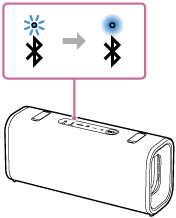
When the BLUETOOTH connection is established, you hear the notification sound from the speaker. Then, the activity of the BLUETOOTH indicator on the speaker changes from flashing to lit.
- Start playback on the BLUETOOTH device.
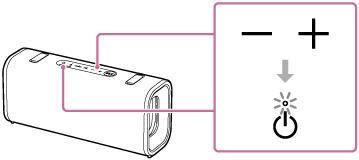
- Adjust the volume by pressing the volume buttons on the speaker or operating the BLUETOOTH device.
When you press the volume buttons on the speaker or adjust the volume on the BLUETOOTH device, power indicator on the speaker flashes once or 3 times.
Depending on the BLUETOOTH device you are using, power indicator on the speaker may not flash even if you adjust the volume on the BLUETOOTH device.
Press and hold the volume buttons on the speaker for rapid adjustments.
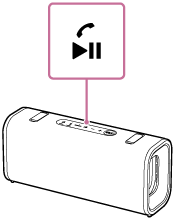
During playback, you can use the playback button on the speaker to perform the following operating procedures.
Pause
Press the playback button on the speaker during playback to pause. Press it again to cancel pause.
Skip to the beginning of the next track
Press the playback button on the speaker twice quickly during playback.
Skip to the beginning of the current or previous track (*)
Press the playback button on the speaker 3 times quickly during playback.
(*) The above operating procedures vary depending on the BLUETOOTH device in use.
Hint
-
You can play music while charging the built-in battery using a USB PD compatible AC adaptor. However, charging may take a long time depending on the speaker's usage. If charging is your priority, stop playback or turn off the speaker before charging.
-
The speaker supports content protection by the SCMS-T method. You can listen to music (or audio) from the smartphone or mobile phone, which supports the SCMS-T method, through the speaker.
-
When you set the volume to the maximum or minimum level on the speaker, the power indicator on the speaker flashes 3 times.
-
Pressing and holding the playback button on the speaker for about 5 seconds makes the speaker play the music track stored for demonstration purposes. To disable this feature, press the playback button on the speaker once again.
Note
-
If the communication condition is poor, the BLUETOOTH device may react incorrectly to the operations on the speaker.
-
When using in a place with a high temperature, the volume may decrease to protect the built-in battery.
-
When the built-in battery is running low, the maximum speaker volume may decrease.
-
Depending on the BLUETOOTH device, it may be necessary to adjust the volume or set the audio output setting on the connected device.
-
Noise or sound interruption may occur depending on the BLUETOOTH device connected with the speaker, the communication environment or the usage environment.