


Listening to music wirelessly with 2 speakers (Stereo Pair function)
To use the Stereo Pair function, 2 units of the ULT FIELD 3 are required. By connecting 2 speakers via a BLUETOOTH connection, you can enjoy more powerful sound.
To provide stereo playback, one speaker connected via a BLUETOOTH connection plays the sound on the left channel (left side). The other speaker connected via another BLUETOOTH connection plays the sound on the right channel (right side).
Before operating the speaker, make sure of the following:
-
Update the pre-installed software to the latest version on each and every speaker to connect for the function.
-
When setting up the speakers for the Stereo Pair function, make sure that the 2 speakers to connect for the function are located within 1 m (3.2 ft) from each other. Stop music playback if it is in progress.
-
When playing music, make sure that all of the devices to connect for the function are located within 30 m (98.4 ft) in your line of sight.
Maximum communication range may shorten under the following conditions.
-
There is an obstacle such as a person, metal, or wall between the speaker and BLUETOOTH device.
-
A wireless LAN device is in use near the speaker.
-
A microwave oven is in use near the speaker.
-
A device that generates electromagnetic radiation is in use near the speaker.
-
- Turn on both speakers.
The power indicator on the speaker lights up.
The BLUETOOTH indicator on the speaker flashes slowly.
If a previously connected BLUETOOTH device is nearby, the speaker may automatically connect to it. In this case, either deactivate the BLUETOOTH function on the BLUETOOTH device or turn off the BLUETOOTH device itself.
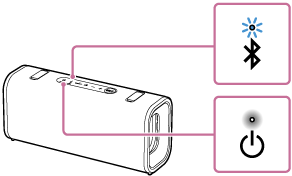
When the speaker has no pairing information, the BLUETOOTH indicator on the speaker keeps double flashing in blue. This applies to cases such as when using the BLUETOOTH function for the first time after purchase.
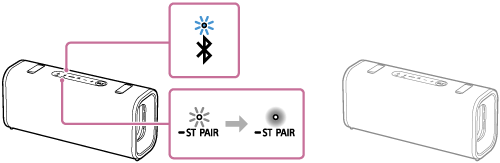
- On either one of the speakers, press and hold the ST PAIR (Stereo Pair) button for about 2 seconds.
You hear the notification sound and the BLUETOOTH indicator and the ST PAIR (Stereo Pair) indicator on the speaker flash slowly. In about 5 seconds, you will hear the notification sound from the speaker again, and the ST PAIR (Stereo Pair) indicator on the speaker will stop flashing and stay lit.
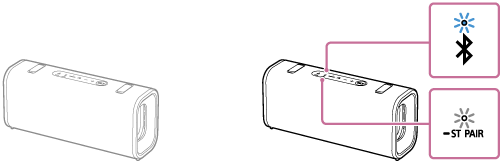
- On the other speaker, press and hold the ST PAIR (Stereo Pair) button for about 2 seconds.
You hear the notification sound and the BLUETOOTH indicator and the ST PAIR (Stereo Pair) indicator on the speaker flash slowly.
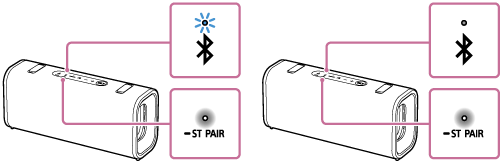
- Check the state of the indicator on each of the 2 speakers.
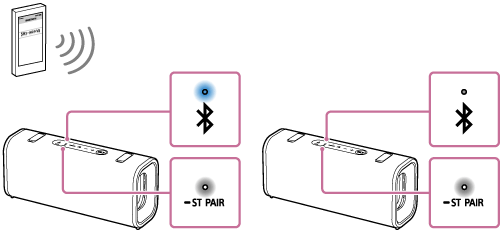
When the speakers are connected by the Stereo Pair function, you hear voice guidance (Left/Right) from the speaker. Then, the ST PAIR (Stereo Pair) indicators on both speakers stay lit and the BLUETOOTH indicator on the second speaker turns off.
Hint
-
When the 2 speakers are immediately connected by the Stereo Pair function, the BLUETOOTH indicator and the ST PAIR (Stereo Pair) indicator on the speaker may not flash and the ST PAIR (Stereo Pair) indicator may light instead.
-
Set up the second speaker within 1 minute. If you do not set it up within 1 minute, the setting of the first speaker will be canceled.
-
- Operate the speaker of which the BLUETOOTH indicator is flashing to establish a BLUETOOTH connection with a BLUETOOTH device.
When the BLUETOOTH connection is established, you hear the notification sound from the speaker. Then, the activity of the BLUETOOTH indicator on the speaker changes from flashing to lit.
- Start playback on the BLUETOOTH device, and adjust the volume to an adequate level.
- Press the volume buttons on one of the speakers to adjust the volume.
Volume adjustment of one speaker is reflected in the other.
For stereo playback, the speaker with the lit BLUETOOTH indicator is set to the left channel (left side).
To terminate the Stereo Pair function
Press and hold the ST PAIR (Stereo Pair) button on one of the speakers for about 2 seconds until you hear the notification sound.
The ST PAIR (Stereo Pair) indicator on the speaker turns off.
Hint
-
When making or receiving a call, only operate the speaker with the lit BLUETOOTH indicator.
-
If any other BLUETOOTH devices, such as a BLUETOOTH mouse or BLUETOOTH keyboard, are connected to the BLUETOOTH device that is connected to the speaker, there may be distorted sound or noise in the speaker output. In this case, terminate the BLUETOOTH connection between the BLUETOOTH device and other BLUETOOTH devices.
-
When using the Stereo Pair function, the codec automatically switches to SBC.
-
Turning off the speakers does not turn off the Stereo Pair function. When one of the speakers is turned back on, it attempts to establish a connection for the Stereo Pair function. To use the Stereo Pair function, turn on the other speaker within 1 minute. However, when the BLUETOOTH standby function remains active (*) on both of the speakers, turning on either of the speakers automatically turns on the other and establish a connection for the Stereo Pair function between the speakers.
(*) The BLUETOOTH standby function is activated only while the speaker is connected to an AC outlet by a USB PD compatible AC adaptor.
Note
-
After you restart or initialize either of the speakers while the Stereo Pair function is activated, be sure to press the ST PAIR (Stereo Pair) button on the other speaker to terminate the Stereo Pair function. If you continue to use the speaker without terminating the Stereo Pair function, you will have a problem, such as a failure to establish a BLUETOOTH connection or a sound interruption.
-
While the Stereo Pair function is activated, any attempt, which is made from the connected BLUETOOTH device, to start the second speaker fails.