


About the Duet Assist function
The Duet Assist function allows you to automatically adjust the volume of each microphone to an appropriate balance when using 2 microphones.
The Duet Assist function is enabled at the time of purchase.
To enable or disable the Duet Assist function
- Turn on the receiver.
Press and hold the power button on the receiver for about 2 seconds.
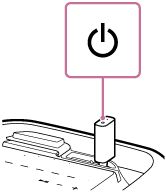
- Press the power button on the receiver 3 times quickly.
-
When the Duet Assist function is disabled, the power indicator on the receiver flashes 3 times in white (*).
-
When the Duet Assist function is enabled, the power indicator on the receiver flashes twice in white (*).
(*) If the remaining built-in battery power is low, the power indicator flashes in orange. For more details, see “About the indicators.”
-
Hint
-
The setting is retained on the receiver even when the receiver is turned off.