


In case of water exposure
The microphone and receiver are not designed to be waterproof. Depending on how they are used, water may get inside, potentially causing fire, electric shock, or malfunction. Review the following points and use the product correctly.
To maintain performance
-
Do not insert the USB plug while the microphone, receiver, or USB cable is wet.
-
Do not splash water onto the microphone or receiver.
-
Do not drop the microphone or receiver into water or use them underwater.
-
Do not use the microphone or receiver in places with high humidity, such as bathrooms.
-
Do not drop or subject the microphone or receiver to impact. Deformation or damage may cause deterioration in performance.
-
If water splashes onto the microphone or receiver, hold the USB port facing down and shake it 2 or 3 times to remove any water droplets. Then, immediately wipe the port with a dry, soft cloth and leave it at room temperature to dry.
-
If the microphone or receiver is wet when you charge it, it may cause corrosion of the port. Before charging, thoroughly wipe off any moisture with a dry, soft cloth, and leave it at room temperature to dry.
Note that malfunctions caused by water damage due to improper handling are not covered by the warranty.
-
Microphone
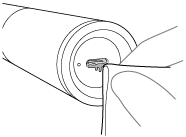
-
Receiver
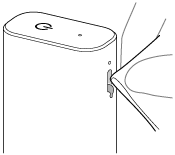
-
-
If the port of the microphone or receiver become dirty, clean it with a dry, soft cloth.
-
If cracks or deformation are observed, avoid using the microphone or receiver in places where it may get wet, consult Sony support contact or your nearest Sony dealer.