


Subwoofer
Front
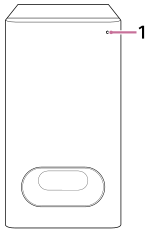
-
Power indicator (colored)
Indicates the subwoofer status by lighting or flashing in 3 colors (white/blue/red).
Rear
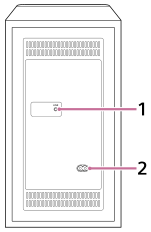
-
LINK
- Press: Press this button when the bar speaker and subwoofer do not connect properly with the “Sony | BRAVIA Connect” app. Follow the instructions on the app.
- Press for more than 2 seconds and release: Turns on/off the subwoofer.
- Press and hold for more than 10 seconds: Resets the subwoofer.
-
AC inlet
TP1001834106