


Mounting the Bar Speaker on a Wall
Mount the bar speaker under the TV mounted on a wall.
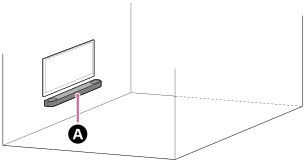
 Bar speaker
Note
- Hang the bar speaker horizontally on the reinforced wall.
- Ask a Sony dealer or licensed contractor to install the bar speaker securely with full consideration of safety.
- Sony shall not be held responsible for accidents or damage caused by improper installation, lack of installation strength, misuse, or natural disaster.
- Two or more persons are required to hang the bar speaker for safety.
-
Prepare two screws (not supplied) that are suitable for the wall mount holes on the rear of the bar speaker.
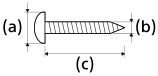
(a) 6 mm to 9.5 mm (1/4 in to 3/8 in)
(b) 4 mm (3/16 in)
(c) 30 mm (1 3/16 in) or longer
Reference: Hole on the rear of the bar speaker
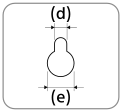
(d) 5.1 mm (7/32 in)
(e) 10 mm (13/32 in)
Note
- Prepare screws (not supplied) that are suitable for the wall material and stability. The screw may damage the wall depending on the wall material.
-
Measure the depth of the mounted TV (f) and find out the required space between the bottom of the TV and the top of the bar speaker (g).
Space is required to ensure that the TV does not interfere with the output surround sound from the bar speaker towards the ceiling.
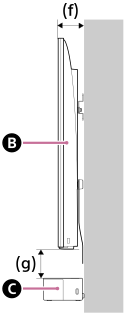
 TV
TV
 Bar speaker
Depth of the mounted TV (f) Required space between the bottom of the TV and the top of the bar speaker (g) Shorter than 85 mm (3 3/8 in) 120 mm (4 3/4 in) or longer 85 mm (3 3/8 in) or longer 200 mm (7 7/8 in) or longer -
Align the vertical line above the “
 TV CENTER LINE” printed on the WALL MOUNT TEMPLATE (paper) (supplied) with the center of the width of your TV.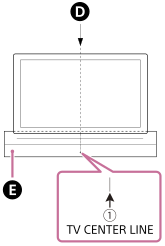
 Center of the TV
 WALL MOUNT TEMPLATE
-
Align the “
 BAR SPEAKER TOP LINE” printed on the WALL MOUNT TEMPLATE with the bottom of the required space between the bottom of TV and the top of the bar speaker (g) measured in step 2, then adhere the WALL MOUNT TEMPLATE on the wall with a commercially available adhesive tape, etc.
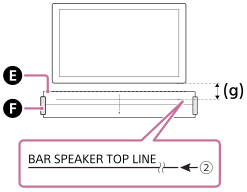 WALL MOUNT TEMPLATE
 Adhesive tape, etc.
Note
- When adhering the WALL MOUNT TEMPLATE on the wall, smooth it out fully.
- Fasten the screws prepared in step 1 securely into the screw marks on the “
 SCREW LINE” printed on the WALL MOUNT TEMPLATE.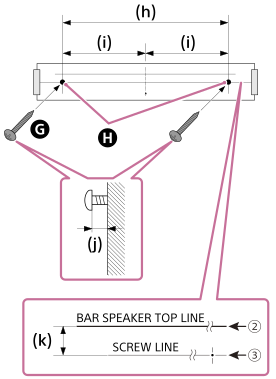
 Screw
Screw
 Marks
Marks
(h) 801 mm (31 1/2 in)
(i) 400.5 mm (15 3/4 in)
(j) 8.5 mm to 9.5 mm (approx. 11/32 in)
(k) 20 mm (13/16 in)
Note
- Fasten the screws securely in the wall beam.
-
Remove the WALL MOUNT TEMPLATE.
-
Connect cables to the bar speaker.
- Connect the HDMI cable (supplied) to the HDMI OUT (TV (eARC/ARC)) jack on the bar speaker.
- Connect the AC power cord (mains lead) (supplied) to the AC inlet on the bar speaker.
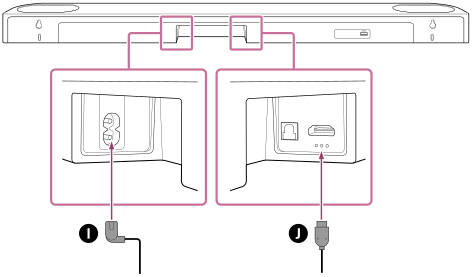
 AC power cord (mains lead)
 HDMI cable
-
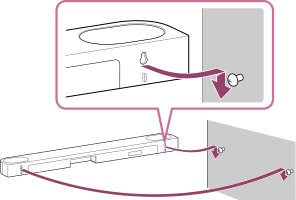
Hang the holes on the rear of the bar speaker on the screws.
Align the holes on the rear of the bar speaker with the screws, then hang the bar speaker on the two screws.
-
Connect the HDMI cable (supplied) connected to the bar speaker to the eARC/ARC HDMI input jack on the TV.
-
Connect the AC power cord (mains lead) connected to the bar speaker to the AC outlet (mains).
-
Perform [Speaker positioning and volume level settings](*) on the app in the following cases.
- When changing the position and installation method of the bar speaker and subwoofer
- When changing the viewing environment, such as changing the layout of furniture
- When changing the position of daily viewing
*Displayed by tapping [Settings] - [Sound Settings] - [Speaker positioning and volume level settings] on the remote control screen on the app.