


Indicators on the Bar Speaker
There are two indicators that indicate the status of the bar speaker.
The sub status indicator (white) is on the left and the main status indicator (colored) is on the right.
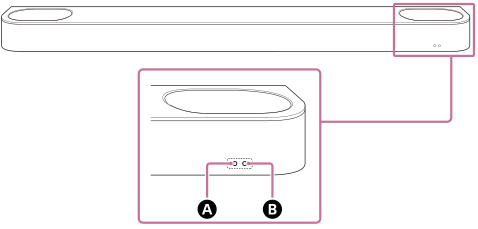
 Sub status indicator (white)
 Main status indicator (colored)
Turning on/off
Main status indicator
-
 (Turned off)
The bar speaker is turned off.
-
 (Flashing slowly in white)
Power on/off is processing.
Audio input/muting
Main status indicator
-
 (Lit up in white)
TV input is selected.
-
 (Lit up in blue)
BLUETOOTH input is selected.
A BLUETOOTH device is connected to the speaker system.
-
 (Flashing twice repeatedly in blue)
The speaker system is in BLUETOOTH pairing standby status.
-
 (Flashing in blue)
The connection with the BLUETOOTH device is in progress.
-
 (Flashing twice in white)
Switching to TV input is in progress.
-
(Flashing twice in blue)
Switching to BLUETOOTH input is in progress.
-
 (Flashing slowly in white/blue alternately)
The speaker system is being set up.
Sub status indicator
-
 (Flashing every 2 seconds in white)
The speaker system is muted.
Setup/operation feedback
Sub status indicator
-
 (Lit up once for a longer time in white)
The setting is switched to on.
-
 (Flashing twice in white)
The setting is switched to off.
-
 (Lit up once briefly in white)
The volume is going up and down.
-
 (Flashing three times in white)
Operation is invalid. For example, setting cannot be changed, volume is at upper or lower limit, etc.
Special conditions
Main status indicator
-
 (Flashing quickly in blue)
The speaker system is being registered on the app.
-
 (Flashing in white/blue alternately)
Software updating/resetting, etc. is in progress.
-
 (Flashing in red)
An abnormality or error has been detected. Follow the steps in “Troubleshooting.”
-
(Flashing every 2 seconds in white)
The update is complete.