


Attaching/detaching the remote commander (GP-VPT3)
When attaching or detaching the remote commander to or from the main unit, follow the instructions below.
Improper attachment or detachment may cause the remote commander to fall, leading to accidents, injuries, or damage to this unit.
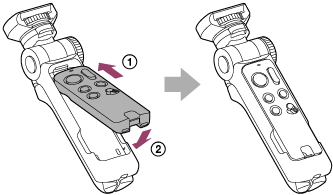
To attach the remote commander
Insert the remote commander ( ) into the remote commander compartment of the main unit, starting from the tip, and push it in until you hear a click (
 ).
).
Note
-
Be careful not to pinch your fingers when attaching the remote commander.
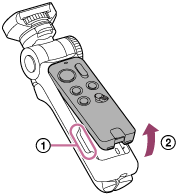
To detach the remote commander
Put your fingers in the notches () on the main unit, grab both sides of the remote commander, and pull it up ().
Note
-
When using this unit, or when lifting or carrying it, always hold it by the grip/tripod. If you use or lift it by holding only the remote commander, the remote commander may be detached from the grip/tripod, causing the camera to fall and possibly resulting in an accident or injury.