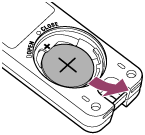
About the battery
The supplied lithium coin cell battery is installed in the remote commander at the time of purchase. Open the battery cover and remove the insulating sheet before use.
Hint
-
If you are using GP-VPT3, detach the remote commander from the main unit. For detailed instructions on how to detach it, see “Attaching/detaching the remote commander (GP-VPT3).”
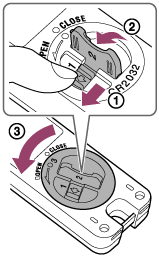
- Turn the battery cover on the back of the remote commander toward “OPEN.”
While sliding the battery cover locking latch in the direction of the arrow (
 ), lift the battery cover turning knob (
 ), and then rotate it counterclockwise (
 ).
).
- Open the battery cover and remove the insulating sheet.
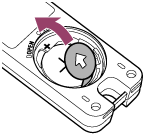
- Turn the battery cover until you reach “CLOSE.”
To insert the battery
When inserting the battery, ensure that the + side of the battery is facing upward.
(+ on the battery chamber indicates the direction of the battery.)
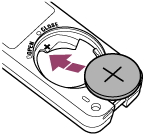
To remove the battery
Take out the battery towards you, as shown by the arrow in the illustration below.