


Zooming the camera
Operate this unit that has a Bluetooth connection with a camera to zoom in/out the camera.
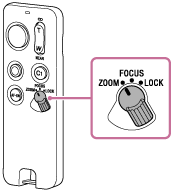
- Set the ZOOM/FOCUS/LOCK switch to the “ZOOM” position.
- Press the Zoom/Focus button (
 ).
).Press the T (Telephoto) end of the button to zoom in on a subject.
Press the W (Wide-angle) end of the button to zoom out on a subject.
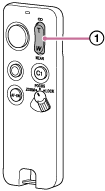
Pressing the Zoom/Focus button deeply speeds up the zooming.
Depending on the camera you are using, some models may not support this function. Check the following websites for a list of compatible cameras.
-
GP-VPT3: https://www.sony.net/dics/gpvpt3/
-
RMT-VP2: https://www.sony.net/dics/rmtvp2/
-
Note
-
The zoom speed varies depending on the camera or lens.
-
The zoom function works with a camera or lens featuring a built-in electronic power zoom. If the digital zoom function of the camera is turned on, digital zooming will be performed.