


Shooting a still image
Operate this unit that has a Bluetooth connection with a camera to shoot a still image.
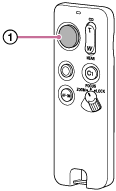
- Press the Shutter button (
 ).
).Press the button halfway down to focus, and then press it all the way down to shoot.
The indicator on this unit turns on when:
-
The camera is in focus using the auto focus function
-
A shot is successfully taken
-