


Pairing the unit with the camera
Establish a Bluetooth connection between this unit and a camera.
Before establishing a Bluetooth connection, you must pair the unit with the camera (device registration).
Make sure that the ZOOM/FOCUS/LOCK switch on the unit is NOT set to the “LOCK” position in advance.
Note
-
For notes on camera operation via the Bluetooth connection, refer to the Help Guide of your camera.
-
The pairing procedure may vary depending on the camera. Refer to the Help Guide of your camera.
- On the camera, select MENU →
 (network) → [Bluetooth] or [Bluetooth Settings] → [Bluetooth Function] → [On].
If the pairing screen appears on the camera's screen, proceed to step 4.
- On the camera, select MENU →(network) → ([Bluetooth]) → [Bluetooth Rmt Ctrl] → [On].*
If the pairing screen appears on the camera's screen, proceed to step 4.
* Depending on your camera, the following menu may appear instead.
MENU →(network) → [Transfer/Remote] → [Bluetooth Rmt Ctrl] → [On] - On the camera, select MENU →(network) → [Bluetooth] or [Bluetooth Settings] → [Pairing] to display the pairing screen.
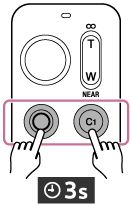
- On this unit, press and hold the MOVIE button and the C1 button simultaneously for at least 3 seconds.
-
When a confirmation message appears on the camera's screen, select [OK].
Hint
-
When pairing GP-VPT3 with the camera, the model name of the remote commander “RMT-VP2” will appear on the camera screen.
When pairing is complete, [Paired.] appears.
-
If the remote commander is not operated for a certain period while the Bluetooth connection is active,  /
/ (no Bluetooth connection) may appear on the camera’s screen. In this case, operating the remote commander will automatically re-establish the Bluetooth connection.
Icons displayed on the camera screen
 /
/ (Bluetooth connection available): The Bluetooth connection between this unit and the camera has been established.
/(Bluetooth connection unavailable): The Bluetooth connection between this unit and the camera is not established.
 (remote commander mark): You can operate the camera using this unit.
Note
-
If pairing fails, the indicator on this unit flashes rapidly. If this happens, start again from step 3.
A pairing attempt times out when a certain amount of time elapses between the actions in step 4 and step 5.
-
In the following cases, you need to perform pairing again.
-
When operating another camera with this unit (If you want to use the original camera again after pairing another camera with this unit, you will need to pair it again.)
-
When resetting the camera's network settings
-
-
Depending on the camera you are using, the following functions cannot be used when [Bluetooth Rmt Ctrl] is set to [On]. If you want to use the following functions after using this unit, set [Bluetooth Rmt Ctrl] to [Off]. For information about the camera's functions, refer to the Help Guide for your camera.
-
Power-saving mode
-
Infrared remote commander
-