


Changes to the notification panel
The notification panel design has changed.
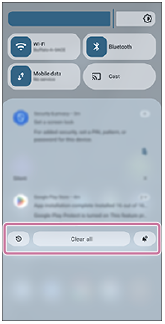
Swipe down from the top of the screen to open the notification panel.
-
 (Notification history): You can display the notification history screen. To view the notification history, tap and turn the following switch on.
[Use notification history]
-
Clear all: Tap the icon to clear all notifications on the notification panel.
-
 (Notification settings): Tap the icon to display the notification settings screen.
TP1002509518