


Changes and new features in the Quick settings panel
The layout of the Quick settings panel has changed, and you can now change the size of the tiles.
Additionally, some tile names have been changed. Supplementary information is now displayed when tiles are shown in a larger size.
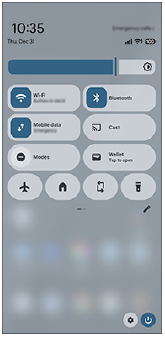
Perform the following procedure to change the size and arrangement of the tiles in the Quick settings panel.
-
Swipe down twice from the top of the screen to open the Quick settings panel.
-
Tap the icon to display the tile editing screen.
 (Edit)
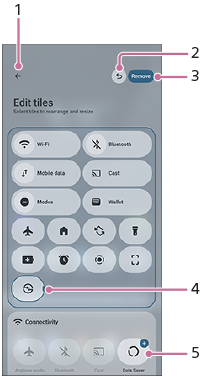
Tile editing screen
-
Confirmation icon
You can confirm your edits and return to the Quick settings panel.
-
Undo button
Tap this button to revert an edit to the previous state. If you tap the button repeatedly to revert to the pre-editing state, the button will disappear.
-
Remove tile button
Remove a tile from the Quick settings panel.
-
Tap a tile and then drag the right edge of the tile to change its size.
-
Tap a tile with a + mark to add the tile to the Quick settings panel.
After adding tiles to the Quick settings panel, you can change the arrangement by dragging and dropping the tiles.
Hint
-
In the Quick settings panel, some settings have changed their names. The following is an example of the changed names.
Before updates: [Internet]
After updates: [Wi-Fi]/[Mobile data]
-
You can now control some functions, such as the Wi-Fi or Bluetooth function, by simply tapping the icons of their tiles. To turn off the Wi-Fi function itself, long-press the Wi-Fi tile and operate the Wi-Fi function in the Settings menu.
-
Depending on the tile, you can display advanced settings by tapping or long-pressing the icon or the name of the setting.
-
Swipe up from the bottom of the tile editing screen to display the bottom part, and then tap the following button to reset all Quick settings tiles to their original settings.
[Reset]