


Controlling the audio device
You can use the multi-function button (A) to perform the following.
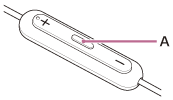
-
To play music
During pause, press the multi-function button once briefly.
-
To pause
During music playback, press the multi-function button once briefly.
-
To skip to the beginning of the next track
Press the multi-function button twice briefly. (
 )
) -
To skip to the beginning of the previous track or the current track during playback
Press the multi-function button 3 times briefly. (
) -
To activate the voice assist function
During music playback or pause, press and hold the multi-function button for about 2 seconds. (
 )
)
You can use the volume button (B) to perform the following.
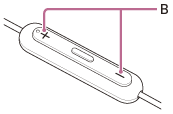
-
To increase the volume
Press the + side of the volume button.
-
To lower the volume
Press the – side of the volume button.
Note
- Depending on the connected device, OS, or application software you are using, the function may not work properly. In that case, operate the connected device.