


Receiving a call
When you receive an incoming call, you will hear a ring tone from the headphones.
-
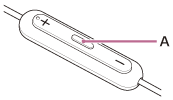
When you hear the ring tone, press the multi-function button (A) and receive the call.
When you receive an incoming call during music playback, playback pauses and you will hear a ring tone from the headphones.
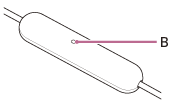
You can talk using the microphone (B) on the headphones.
If no ring tone is heard via the headphones
Check that the headphones connect to the smartphone correctly.
-
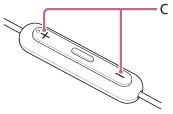
Press the volume button (C) to adjust the volume.
-
When you finish your phone call, press the multi-function button on the headphones to end the call.
If you received a call during music playback, music playback resumes automatically after ending the call.
Hint
- The volume for a call can be adjusted during a telephone conversation only.
- The headphones volume during a call and during music playback can be independently adjusted. Even if you change the volume during a call, the volume of music playback does not change.
Note
- Depending on the connected device, OS, or application software you are using, the following may occur.
- When you operate the headphones, the function does not work properly.
In that case, operate the connected device. - When you receive an incoming call during music playback, playback does not pause.
- When you receive an incoming call during music playback, playback does not resume automatically even if you finish the call.
- When you operate the headphones, the function does not work properly.
- If the person you are calling is concerned about the surrounding environment noise, move the headphone microphone closer to your mouth. When doing so, do not cover the microphone hole with your fingers.