


Using the voice assist function (Siri)
By using Siri that comes with the iPhone, you can speak to the headphones microphone to operate the iPhone.
-
Turn on Siri.
On an iPhone, select [Settings] - [Siri & Search].
Enable [Press Home for Siri] and [Allow Siri When Locked].
The operation above is an example. For details, refer to the operating instructions supplied with the iPhone.
For details on Siri, refer to the operating instructions or support website of the iPhone.
-
When the iPhone is in standby or playing music, press and hold the multi-function button (A) of the headphones for about 2 seconds.
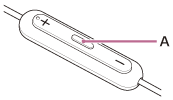
Siri is activated.
-
Make a request to Siri through the headphones microphone (B).
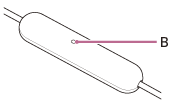
For details on the apps which work with Siri, refer to the operating instructions for the iPhone.
After activating Siri, Siri will be deactivated when a certain time has passed without requests.
Note
- Siri cannot be activated when you say “Hey Siri” even when the iPhone’s “Hey Siri” setting is enabled.
- Siri may not be activated depending on specifications of the smartphone or application version.