


Functions for a phone call
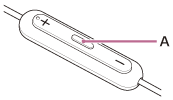
You can use the multi-function button (A) to perform the following.
During an incoming call
- Press the multi-function button once to receive a call.
- Press and hold the multi-function button for about 2 seconds to reject a call.
During a call
- Press the multi-function button once to finish a call.
- Press and hold the multi-function button for about 2 seconds to turn on/off the microphone. Or, the microphone is turned off while you press and hold the multi-function button. The operation for which the microphone turns on/off varies depending on the model (Android smartphone).
- Only while you press and hold the multi-function button, you can turn off the microphone (iPhone).
Note
- Depending on the connected device, OS, or application software you are using, the function may not work properly. In that case, operate the connected device.