


Using the supplied headphone cable
You can use the headset as noise canceling headphones while the headset is connected to a device via the supplied headphone cable and the headset is turned on.
-
Connect a playback device to the headphone cable input jack with the supplied headphone cable.
Be sure to connect the L-shaped plug into the connecting device.
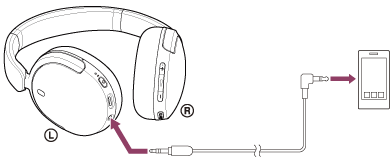
-
Turn on the headset.
You will hear a notification sound indicating that the headset is turned on.
Hint
- You can listen to music even if the headset is turned off. In this case, the noise canceling function cannot be used.
- To use the noise canceling function/Ambient Sound Mode, turn the headset on.
- The headset turns off automatically if you disconnect the supplied headphone cable from the headset while it is turned on.
- When an incoming call arrives, a ring tone is heard via the headset. Answer the call using your smartphone, and talk using the microphone of the phone. You can hear the caller’s voice from the headset. If you disconnect the headphone cable from the smartphone, you can talk using the microphone and speaker of the phone.
Note
- Use the supplied headphone cable only.
- When plugging or unplugging the cable, hold the plug and plug it straight into the headphone cable input jack. Pulling on the cable or applying excessive force may cause it to break.
- Make sure the plug is fully inserted. If the plug is not fully inserted, sound may not be heard.
- When using the headphone cable, the BLUETOOTH function cannot be used.
- The volume up/volume down button and play/call/next/previous button cannot be used. Perform operating procedures, such as adjusting the volume and play/pause, on the playback device.
TP1002281808