


Controlling the audio device (BLUETOOTH connection)
If your BLUETOOTH device supports the AVRCP profile’s operating function, the following operating procedures are available. The available functions may vary depending on the BLUETOOTH device, so refer to the operating instructions supplied with the device.
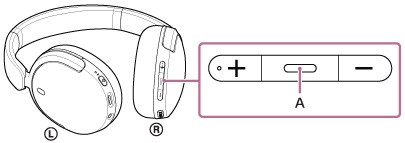
You can use the play/next/previous button (A) to perform the following.
-
To play:
Press once briefly while paused.
-
To pause:
Press once briefly during playback.
-
To skip to the beginning of the next track:
Press twice quickly. (
 )
) -
To skip to the beginning of the previous track or the current track during playback:
Press 3 times quickly. (
) -
To fast-forward:
Press twice quickly, holding the second press. Release the button at the desired playback point. (
 )
) -
To fast-reverse:
Press 3 times quickly, holding the third press. Release the button at the desired playback point. (
)
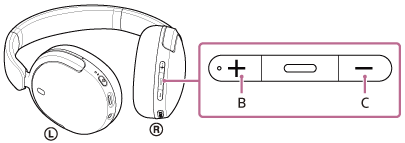
You can use the volume up button (B) and volume down button (C) to perform the following.
-
Adjust the volume.
Note
- If the communication condition is poor, the BLUETOOTH device may malfunction in response to the operating procedure on the headset.
- The available functions may vary depending on the connected device, the music software, or app used. In some cases, the device may function differently or may not work even if the above operating procedures described are performed.
-
When you use an iPhone, Siri may be activated by pressing and holding the
 (play/next/previous) button.