


About the buttons on the headset
Use the buttons on the right unit of the headset for various operations, such as music playback, phone calls, or switching to the Ambient Sound Mode.
Main operations
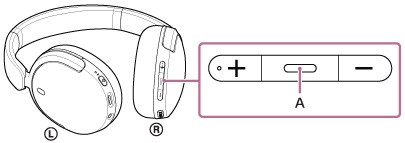
Play/call/next/previous button (A)
-
Press once briefly
During music playback: Plays or pauses music.
For a phone call: Receives a call when there is an incoming call. Finishes the call during a call.
-
Press twice quickly (
 )
) Skips to the beginning of the next track.
-
Press 3 times quickly (
)Skips to the beginning of the previous track or the current track during playback.
-
Press twice quickly, holding the second press (
 )
) Fast-forwards the track. Release the button at the desired playback point.
-
Press 3 times quickly, holding the third press (
)Fast-reverses the track. Release the button at the desired playback point.
Volume up button (B) and volume down button (C)
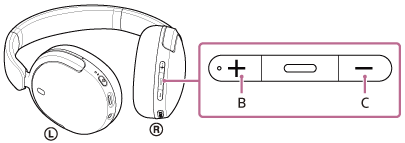
Adjust the volume.
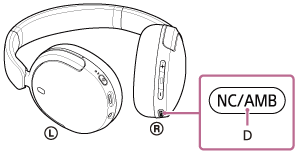
Noise canceling/Ambient Sound Mode button (D)
-
Press once briefly
Switches the noise canceling function and Ambient Sound Mode.
-
Press twice quickly
To use Quick Access (settings on the “Sound Connect” app are required)
-
Press 3 times quickly
To use Quick Access (settings on the “Sound Connect” app are required)