


Starting/stopping operation by attaching/detaching (AUTO START/STOP)
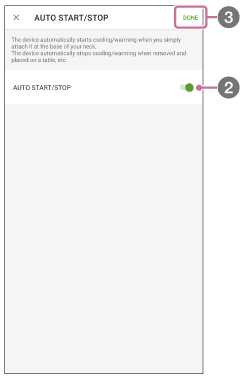
The “AUTO START/STOP” function allows the unit to start cooling/warming automatically when you attach the unit to your neck, and allows it to stop cooling/warming automatically when you remove the unit and place it on a desk, etc. When started with the [AUTO START/STOP] function, the unit operates in the same mode as last time.
- On the “REON POCKET” app screen, tap
 (Settings icon) - [AUTO START/STOP].
 - Tap [AUTO START/STOP] switch.
- Tap [Done] on the upper right corner of the screen.
The [AUTO START/STOP] function is switched on or off.
Note
- The [AUTO START/STOP] function may not work properly depending on the usage conditions, such as when you use the unit by holding it in your hand or when you attach the unit to a place other than the bottom of your neck.
