


WARM mode
This page introduces recommended use to make the cooling/warming section warm (SMART WARM mode).
In the SMART WARM mode, the unit automatically adjusts the temperature of the cooling/warming section according to the following conditions.
- The temperature around the unit
- Your movements such as walking or staying still
- The temperature and humidity data sent from REON POCKET TAG*
- Your temperature preference
*When the unit is linked to REON POCKET TAG (sold separately or included with the RNPK-P1T/RNPK-P1PT) (The models sold may differ depending on the country or region.)
According to the temperature of the cooling/warming section and the conditions above, the unit may automatically increase or reduce the warming intensity.
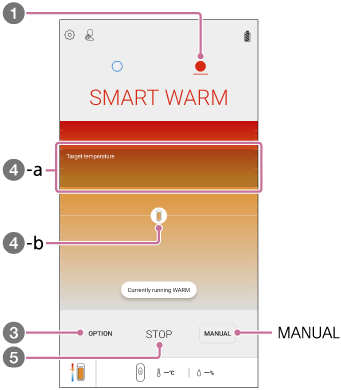
- On the “REON POCKET” app screen, tap
 (WARM icon).
 - If the above screen is not displayed, tap [START].
- Tap [OPTION].
- Set the temperature preference.
Once the setting is made, warming operation will start. The unit automatically adjusts the temperature of the cooling/warming section. When warming operation has continued for about 1 hour, operation is paused for about 1 minute, and then resumes automatically.
- Target temperature (
 -a): Indicates the target temperature range of the cooling/warming section (depending on the temperature preference that you have set).
 - Unit icon (-b): Indicates the current temperature of the cooling/warming section. The circle around the unit icon indicates the intensity of warming. When the unit automatically pauses warming operation, the icon becomes translucent.
- Target temperature (
- To stop warming, tap [STOP].
Using in the MANUAL WARM mode
In the MANUAL WARM mode, the warming strength is kept at the selected temperature level.
Tap [MANUAL], and then tap the desired temperature level.
The temperature level changes as follows.
[1] (low) → [2] (medium) → [3] (strong) → [4] (maximum)
- When warming operation has continued for about 1 hour, operation is paused for about 1 minute, and then resumes automatically.
- The warming operation will automatically stop in about 8 hours.
Note
-
When the following abnormalities are detected, the warming operation automatically stops (the mode LED flashes in purple for about 8 seconds).
- The temperature inside the unit has become extremely high.
- The temperature of the cooling/warming section has become extremely high.
